Can you track subscriptions without linking your bank?
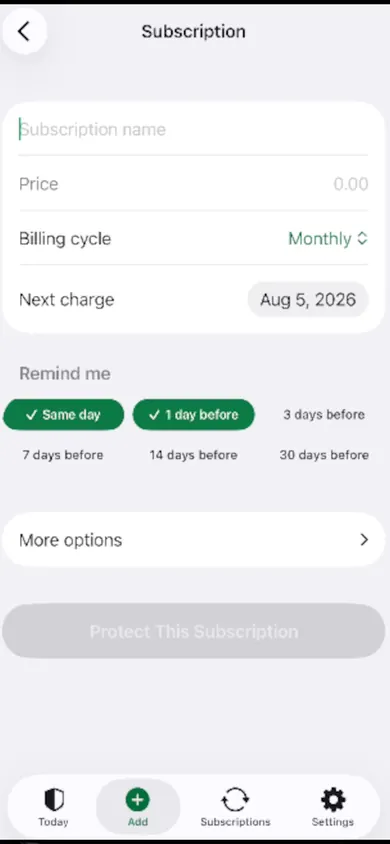
Yes: a manual subscription tracker lets you type each subscription in once, with its price and next charge date, and reminds you before it renews, without ever asking for a bank login. You do the finding yourself, which takes about fifteen minutes the first time. After that, the tracker carries the dates.
We make one of these apps, MoneyShield, so weigh our view accordingly. Below we compare it with three other iPhone trackers, using only what their App Store listings said on November 3, 2026.
Who a no-bank tracker is not for
You want charges found for you. A bank-connected app sees new charges as they happen. A manual tracker only knows what you type.
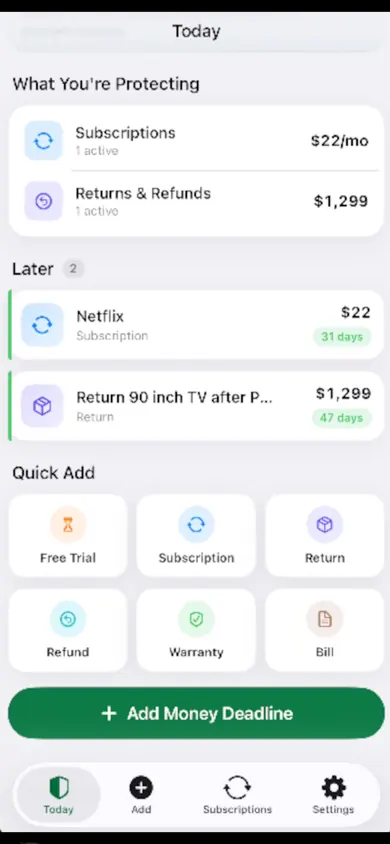
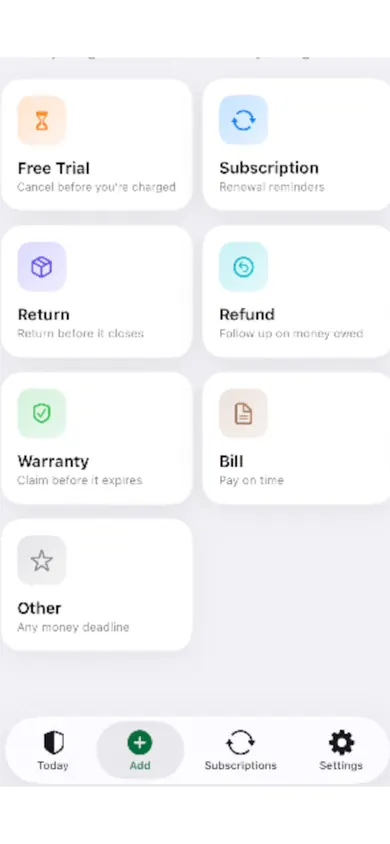
You want a full budget. MoneyShield tracks subscriptions, trials, returns, refunds, warranties and bills. It is not a spending budget and has no bank balances.
You want someone else to cancel. MoneyShield never cancels on your behalf. It shows you the official route and keeps your proof.
Your 15-minute hunt, so far
Start the timer at the top of the page. Your places checked and subscriptions found show up here.
Nothing you tap is stored or sent anywhere. Close the page and it is gone.
Subscription trackers without bank linking, compared
From each app's U.S. App Store listing, checked November 3, 2026. Prices change; check the listing before you buy.
MoneyShield ours
- How subs get in
- You type them in
- Bank link
- None. No email scanning either
- Stand-out
- Cancel First ranking, cancellation proof and follow-up reminder
- Price
- Free plan after 7 days of Full Protection. Plus $3.99/mo, $24.99/yr or $59.99 once
Bobby
- How subs get in
- Pick from a list or create your own
- Bank link
- Not mentioned in the listing
- Stand-out
- Simple, long-running, alerts before bills are due
- Price
- Free with one-off packs from $0.99 to $2.99
TrialHero
- How subs get in
- Import from a screenshot, then confirm
- Bank link
- None, says the listing
- Stand-out
- Trial reminders, screenshot import
- Price
- 5 subscriptions free; Pro Lifetime $19.99
Rocket Money
- How subs get in
- Found from your linked accounts
- Bank link
- Yes, that is how it works
- Stand-out
- Cancels some subscriptions in the app; bill negotiation
- Price
- Free, with Premium in-app purchases listed from $2.99 to $9.99
Who should pick what
- Want the least effort and don't mind linking accounts: Rocket Money.
- Want a simple manual list with a one-off price: Bobby.
- Mostly juggling free trials and hate typing: TrialHero's screenshot import.
- Want to decide what to cancel and keep proof when you do, with no bank link: MoneyShield.
How a no-bank subscription tracker works, in 3 steps
- 01
Hunt once
Fifteen minutes with the five places above. Write down name, price, how often, next date.
- 02
Type it in
Each subscription gets a reminder: same day, or 1, 3, 7, 14 or 30 days before. Alerts up to 30 days ahead are a Plus feature.
- 03
Review monthly
The guided monthly review shows one subscription at a time, one decision each: keep, review later or start cancelling.
One design decision we made: the Protection Record counts only cancellations you confirm. If a cancel didn't go through, it doesn't count as money saved. That keeps the number honest, even if it makes it smaller.
The honest limit: if you forget to add something, MoneyShield will never know about it. The monthly review reminder is there for exactly that.
No-bank subscription tracker questions
Is there a subscription tracker that doesn't connect to your bank?
Yes. Manual-entry trackers such as MoneyShield, Bobby and TrialHero do not ask for a bank login, according to their App Store listings as of November 3, 2026. You add each subscription yourself, or in TrialHero's case from a screenshot you confirm.
Is it safe to link my bank to a budgeting app?
That is a judgment call about the company and its data practices, and we can't make it for you. What a manual tracker changes is simple: no account credentials are shared, so there is nothing about your bank to protect in the first place.
How do I find subscriptions without a bank-linked app?
Check four places: Settings › your name › Subscriptions on iPhone for Apple-billed ones; your card statements for repeat charges (12 months back catches yearly renewals); PayPal or other wallets; and your email, searching words like receipt, renew and trial. The 15-minute hunt at the top of this page walks you through it.
What does a manual subscription tracker miss?
Anything you don't type in. It will not notice a new charge or a price rise on its own. That is the trade: more privacy, a little more effort, and a monthly review to catch what slipped through.
Can a no-bank tracker cancel subscriptions for me?
MoneyShield cannot. It points you to the official cancellation route, with a checklist and request templates, and keeps your confirmation as proof. Rocket Money's listing does describe cancelling within the app, and it links to your accounts.
How much does MoneyShield cost?
You start with 7 days of Full Protection with no payment, then move to the free plan automatically. MoneyShield Plus in the U.S. is $3.99 a month, $24.99 a year or $59.99 once; prices may vary by region.
Related
- MoneyShield: the private subscription tracker for iPhoneSee every subscription, its yearly cost and the next charge date, with reminders before renewals and trials end. No bank login. Free on iPhone.
- How to keep track of subscriptions, from zeroA beginner's way to keep track of subscriptions: find them, list them, total them in 10 minutes. Free on-page tracker, no bank login.
- Cancel through Apple or the company? A 4-tap route finderAnswer up to 3 taps and see the right place to cancel: Apple, Google Play, PayPal or the company itself. Official steps, checked November 2026.
- Set a free trial reminder on iPhone, step by stepA free trial reminder on iPhone that fires before you're charged: a live cancel-by countdown, a free calendar file, and a 3-step app guide.