
How do I set a free trial reminder on iPhone?
Write down the trial's end date, count back 24 hours to get your cancel-by time, and set a reminder for the day before that, in Calendar, in Reminders, or in a tracker like MoneyShield. The 24 hours matter: for trials bought through Apple, Apple's cancel-a-subscription help page (checked November 2026) says to cancel at least 24 hours before the trial ends.
The reminder should fire before the cancel-by date, not on the renewal date.
The free trial reminder, screen by screen
Here is the same job in MoneyShield, in three screens. The numbered pins match the steps.
 1
 23
 4
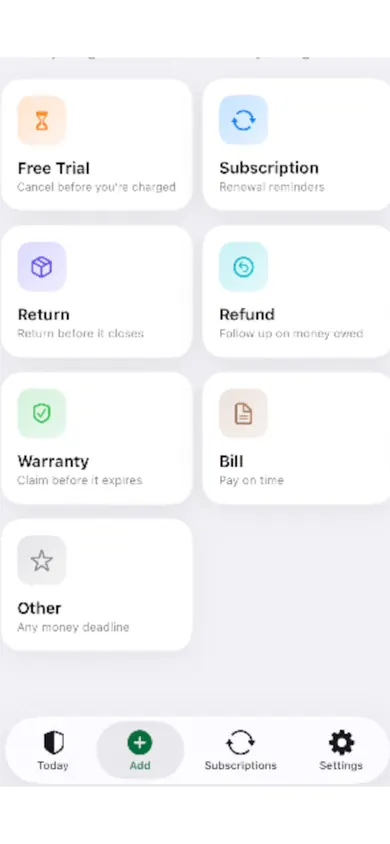
- Add the trial. Free Trial is one of seven deadline types, next to Subscription, Return, Refund, Warranty, Bill and Other.
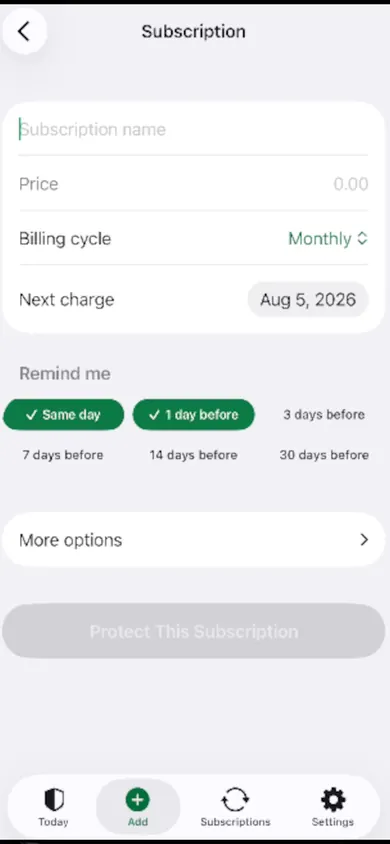
- Enter what it will cost. The price after the trial and the date it would first charge. Monthly, yearly, weekly and custom billing are all there.
- Pick when to hear about it. MoneyShield keeps trial end dates and cancel-by dates, with trial and cancel-by reminders. Tap more than one chip if you like a warning and a last call.
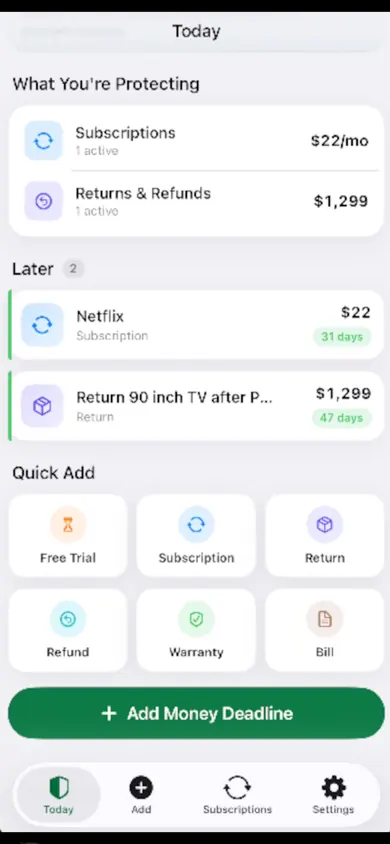
- Watch it on Today, then cancel and record it. The trial sits on Today with its days left. When you decide to cancel, the Cancellation Assistant points to the official route (Apple or the company), and you can save the confirmation number, the paid-through date and a screenshot. A follow-up reminder checks that the cancel actually went through.
Who this is not for
- People with one trial and a good calendar habit. Use the free calendar file further down and skip the app.
- Anyone who wants the app to cancel for them. MoneyShield does not cancel subscriptions or request refunds. You do the cancelling.
- People who want charges found automatically. There is no bank connection and no email scanning, so you type each trial in. If you would rather link your bank, a bank-connected budgeting app suits you better.
Free trial reminder questions
How far before a free trial ends should I cancel?
For trials bought through Apple, Apple's cancel-a-subscription help page (checked November 2026) says to cancel at least 24 hours before the trial ends. For trials billed by the company itself, check its terms; some renew at a set hour on the end date.
Does iPhone remind you when a free trial is ending?
Apple's help page does not promise a reminder. The dependable way is to set your own: a calendar event or a reminder for the day before your cancel-by date. The calculator on this page makes that calendar file for you.
Can I cancel a free trial right after starting it?
Usually yes, and it is the safest habit for trials you are unsure about. Through Apple you go to Settings, tap your name, tap Subscriptions, choose the subscription and tap Cancel Subscription. How long you keep access after cancelling depends on the app, so read the confirmation.
Where do I see trials I signed up for through Apple?
Settings, then your name, then Subscriptions. Trials billed by the company (a website sign-up, a streaming service paid by card) will not appear there; they need their own reminder.
Is a calendar reminder enough?
For one trial, often yes. Once you have three or four running, plus renewals and returns, a single list with dates and a follow-up check is easier to keep honest. That is the job MoneyShield does.
Is MoneyShield free?
You start with 7 days of Full Protection, with no payment required and no charge when the 7 days end. Then you move to the free plan automatically. MoneyShield Plus (U.S.: $3.99 a month, $24.99 a year or $59.99 once) adds unlimited deadlines and subscriptions and early alerts up to 30 days ahead.
Does MoneyShield cancel the trial for me?
No. It reminds you and points you to the official cancellation route, with a checklist, but you do the cancelling. It never connects to your bank or reads your email.
Honest limits
Free plan limits. After the 7 days of Full Protection, the free plan keeps going, but unlimited deadlines and alerts up to 30 days ahead are part of MoneyShield Plus. If you juggle many trials at once, expect to hit the free limit.
Your dates, your accuracy. MoneyShield knows only the dates you type. If a company bills at an odd hour or changes its terms, the reminder will not know.
iPhone only. Data stays on your iPhone. You can make a backup file and restore it on a new iPhone, but there is no web version.
One design decision we made: no bank link, on purpose. It means more typing, and it means nothing about your accounts ever leaves your phone.
A Tuesday night, a 7-day trial
A photo editing app offers 7 days free, then $39.99 a year. It is Tuesday, 9:40 pm. The trial would renew next Tuesday at about the same time, so the safe cancel-by moment is Monday, 9:40 pm.
She adds it as a Free Trial, types $39.99 and yearly, and taps two chips: 3 days before and 1 day before. Saturday morning the first reminder arrives; she has used the app twice and decides it is worth keeping. Sunday night she changes her mind. The second reminder lands on Monday, a day before the renewal, with time to spare. She cancels in Settings, saves a screenshot of the confirmation in MoneyShield, and the follow-up reminder later asks her to check it actually went through.
Your cancel-by date and a free calendar reminder
Fill this in for any trial. It runs in your browser, saves nothing, and makes a calendar file you can open on your iPhone.
Dates are calculated from what you enter, using 24 hours before the trial ends. Your trial's own terms decide the real time.
Open MoneyShield in the App Store
Add your trials, pick when to hear about them, and keep proof when you cancel.

Open MoneyShield in the App Store · Updated November 2026
Related
- MoneyShield: the private subscription tracker for iPhoneSee every subscription, its yearly cost and the next charge date, with reminders before renewals and trials end. No bank login. Free on iPhone.
- How to keep track of subscriptions, from zeroA beginner's way to keep track of subscriptions: find them, list them, total them in 10 minutes. Free on-page tracker, no bank login.
- Cancel through Apple or the company? A 4-tap route finderAnswer up to 3 taps and see the right place to cancel: Apple, Google Play, PayPal or the company itself. Official steps, checked November 2026.
- Helping an elderly parent with subscriptions: questions answeredFor adult children sorting a parent's recurring charges: a live yearly-cost counter, plain answers on cancelling, and how to keep your parent in charge.