
Do you cancel a subscription through Apple or the company?
Cancel through whoever bills you: if Apple sends the receipt, cancel in your iPhone's Settings; if the company charges your card or PayPal directly, cancel with the company. The app on your phone and the company that runs the service can be different from the company that takes your money, and only the one taking the money can stop it.
Cancel where the money goes, not where the app lives.
Apple billing vs company billing, compared
Checked against each provider's own help page on November 3, 2026. We only list what those pages say.
| Billed by Apple | Billed by Google Play | Billed via PayPal | Billed by the company | |
|---|---|---|---|---|
| Where to cancel | Settings, your name, Subscriptions | Google Play, Subscriptions | Settings, Payments, Automatic payments | The company's site, app or support |
| How you can tell | Receipt or invoice email from Apple | Listed in your Play subscriptions | Merchant listed under automatic payments | The company's name on your card statement |
| Family member's sub | Only they can cancel | Not covered here | Not covered here | Depends on the company |
| Official steps | Apple Support | Google Play Help | PayPal Help | The company's help page |
Most cancel mistakes come from one of two places: deleting the app, or cancelling with the wrong company.
Who this tool is not for
If you can already see the subscription in Settings and the Cancel button is right there, tap it; you do not need us. If you think a charge is fraud, call your bank first, not the merchant. And if you want an app that cancels subscriptions for you, MoneyShield is not that: it shows you the official route and keeps your record, but you press the button yourself.
How MoneyShield helps you cancel, in 3 steps
- Add the subscription. Name, price, billing cycle and next charge date, with a reminder same day, 1, 3, 7, 14 or 30 days before.
- Open the Cancellation Assistant. The listing says it points you to the official route, whether you subscribed through Apple or directly with the company, with a step-by-step checklist and copy-ready request templates.
- Keep the proof. Save the confirmation number, paid-through date, a screenshot and notes, then get a follow-up reminder to check the cancellation actually went through.
One design decision we made: no bank connection and no email scanning. That means MoneyShield cannot find a charge you forgot, and it also means your statements never leave your iPhone.
Proof: what the screens show
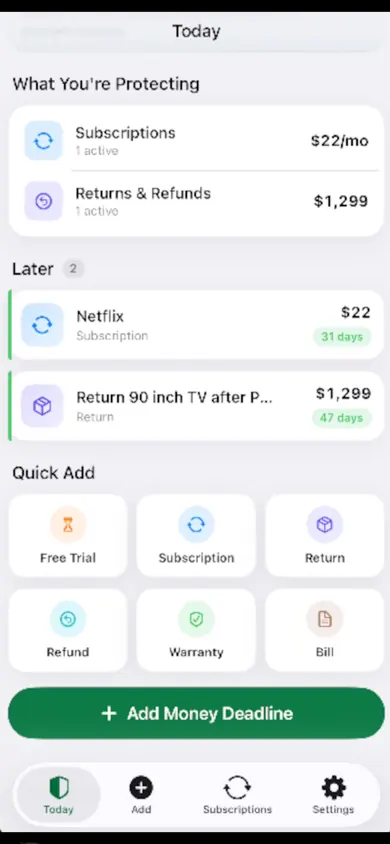
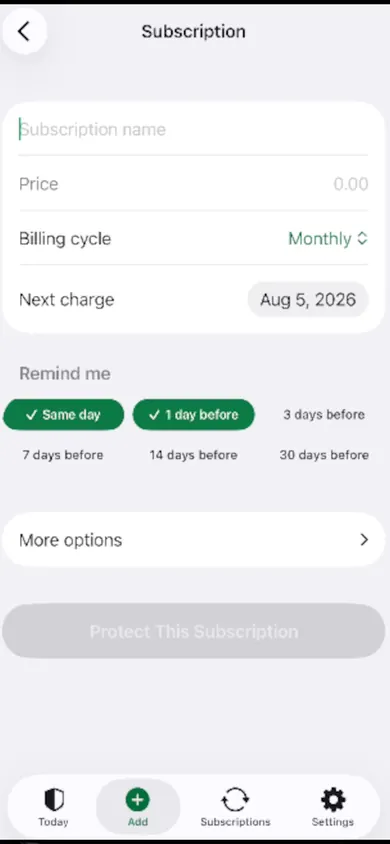
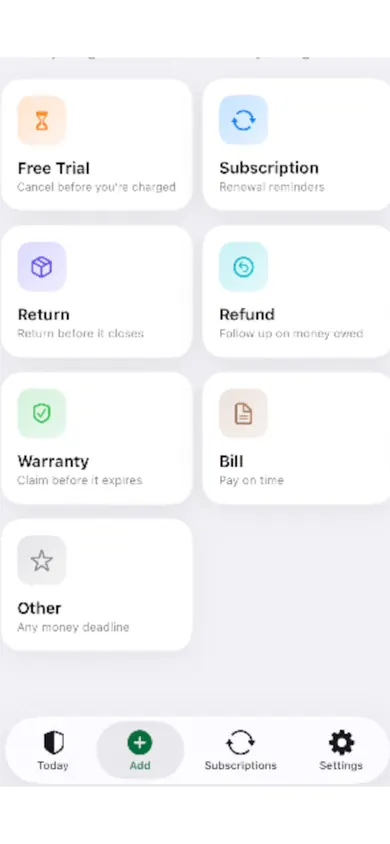
A $9.99 charge nobody remembered
An example, not a customer story. Say a $9.99 charge shows up on the card for a photo editor. The app was deleted in spring. Settings, Subscriptions: nothing there. The quiz above lands on "billed by the company": the card statement names the editor's developer, not Apple. Ten minutes on the developer's account page, one cancel button, one confirmation email, screenshotted. The paid-through date goes into a note so the next statement can be checked.
Deleting an app is a goodbye to the icon, not to the bill.
Honest limits
- MoneyShield does not cancel subscriptions for you, and it does not request or guarantee refunds.
- It does not connect to your bank or scan your email. You add each subscription yourself.
- The free plan has limits. MoneyShield Plus adds unlimited deadlines and subscriptions, alerts up to 30 days ahead, the full Cancel First ranking and export: $3.99 a month, $24.99 a year or $59.99 once (U.S. prices; they may vary by region). You start with 7 days of Full Protection with no payment and move to the free plan automatically.
- Help pages change. The steps in this page are from the providers' own pages on November 3, 2026.
Questions about cancelling the right way
How do I know if I subscribed through Apple or directly with the company?
Search your email for "receipt from Apple" or "invoice from Apple", as Apple Support suggests (published September 29, 2026). If you find one for that service, Apple bills it. If not, the company or another store probably does: check which name appears on your card statement.
Why isn't my subscription in Settings > Subscriptions on my iPhone?
Apple lists three reasons: it was bought with a different Apple Account, it belongs to a family member (only they can cancel it), or you bought it from another company. In the last case, Apple says to contact the company that bills you.
Does deleting the app cancel the subscription?
No. Google says so plainly for Android: "When you uninstall the app, your subscription won't cancel." The same logic applies on iPhone: the subscription lives with whoever bills you, not on your home screen.
Can I cancel an Apple subscription on the company's website?
Usually not. If Apple bills you, the company's website often just points you back to your Apple Account. Cancel where the billing lives.
Can I cancel a family member's subscription?
Not through Apple. Apple Support says: "You can't cancel a family member's subscription." Ask the person whose Apple Account is on the receipt.
What should I save after I cancel?
A screenshot of the confirmation, the date, any confirmation number and the date you are paid through. Then check your next statement to make sure no new charge arrived.
Find the route, then keep the receipt
Add the subscription, follow the official route, and save the confirmation where you can find it next month. Download free on the App Store.

MoneyShield does not give financial advice. Totals and savings are estimates from the prices you enter.
Related
- MoneyShield: the private subscription tracker for iPhoneSee every subscription, its yearly cost and the next charge date, with reminders before renewals and trials end. No bank login. Free on iPhone.
- Helping an elderly parent with subscriptions: questions answeredFor adult children sorting a parent's recurring charges: a live yearly-cost counter, plain answers on cancelling, and how to keep your parent in charge.
- How to keep track of subscriptions, from zeroA beginner's way to keep track of subscriptions: find them, list them, total them in 10 minutes. Free on-page tracker, no bank login.
- Keep track of holiday returns: 2026 deadlinesHoliday return deadlines for 2026, checked and dated, plus a simple way to track every return window before it closes. Free on iPhone.