
How do you keep track of holiday returns?
Write down every return with its store, item, price and exact deadline the day you buy or receive it, then set a reminder about a week before each deadline. Holiday windows are long, which is exactly why they get missed: January feels far away in December.
A long return window feels like time to spare until it isn't.
Holiday return deadlines 2026, checked on November 3, 2026
Stores announce holiday windows at different times. We list only what we could find in dated reports, and mark last year's dates as last year's.
| Store | Bought between | Return by | Status |
|---|---|---|---|
| Amazon | Nov 1 – Dec 31, 2026 | Jan 31, 2027 (Apple-brand: Jan 15, 2027) | 2026 announced |
| Walmart | Oct 1 – Dec 31, 2026 (most items) | Jan 31, 2027 | 2026 reported |
| Target | Nov 1 – Dec 24, 2025 (electronics, entertainment, Target Plus) | Jan 24, 2026; Apple, Beats and phones Jan 8, 2026 | Last year's dates |
| Best Buy | Oct 31 – Dec 31, 2025 | Jan 15, 2026 | Last year's dates |
| Apple Store | Nov 8 – Dec 25, 2025 | Jan 8, 2026 | Last year's dates |
Sources: Amazon 2026 window and the Apple-brand exception from PPC Land, October 2026; Walmart 2026 window from GeekSeller, September 2026, which lists exclusions such as phones, major appliances and protection plans; last year's Target, Best Buy and Apple dates from CBS News, December 2025. The deadline on your own receipt or order page always wins.
Honest limits of a returns tracker
- It only knows what you tell it. MoneyShield does not read store accounts, order emails or bank statements. Every return is something you add.
- It does not process returns. You still pack the box and drop it off. MoneyShield reminds you; the store decides what it accepts.
- The free plan has a cap. Unlimited deadlines, alerts up to 30 days ahead and the receipt photo vault are part of MoneyShield Plus. The free plan covers a smaller list.
- Dates change. Stores can adjust policies. Treat our table as a starting point and copy the date from your own receipt.
Holiday return questions people ask
When is the Amazon holiday return deadline for 2026?
Amazon's holiday window covers items bought from November 1 to December 31, 2026, returnable until January 31, 2027, with Apple-brand products due by January 15, 2027, as reported by PPC Land (October 2026). Amazon said the policy will now apply every year. Check the return window shown on your order, which is the one that counts.
Does the return window start when I buy or when the gift is opened?
It depends on the store. Most holiday windows run from the purchase or delivery date and end on a fixed date in January, so a gift opened on December 25 may already be partway through its window. Ask the giver for a gift receipt or order number early.
Can I return a gift without a receipt?
Some stores accept it for store credit; many do not. A gift receipt or order number makes it far easier. Photograph receipts the day you get them.
What if a store has not announced its holiday dates yet?
Use last year's dates as a rough guide only and set your reminder early. Stores often announce holiday return windows in November. Our table marks which dates are confirmed for 2026 and which are last year's.
How is a return different from a refund?
The return is you sending the item back by the deadline. The refund is the money coming back to your card, which can take days or weeks. Track both: the return deadline and a follow-up date to check the refund arrived.
Can MoneyShield track returns, not just subscriptions?
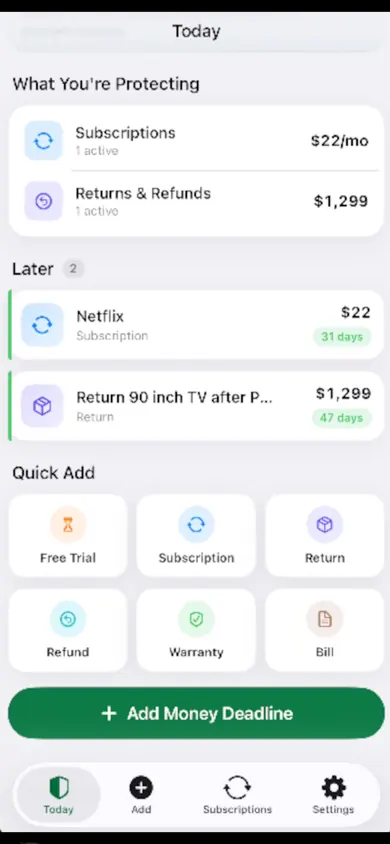
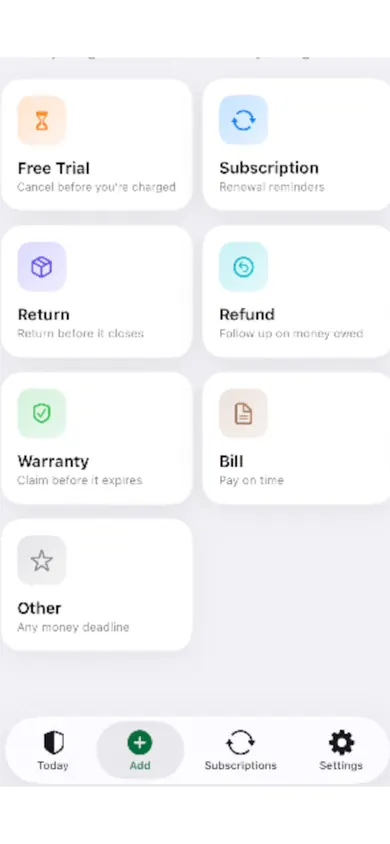
Yes. MoneyShield has Return, Refund, Warranty and Bill deadline types next to subscriptions and free trials, each with reminders. You enter them yourself; it does not connect to stores, your bank or your email.
Is MoneyShield free?
There is a free plan. You start with 7 days of Full Protection with no payment, then move to the free plan automatically. MoneyShield Plus adds unlimited deadlines, alerts up to 30 days ahead and a receipt photo vault, among other things: $3.99 a month, $24.99 a year or $59.99 once in the U.S.
How to track holiday returns in 3 steps
- Capture it the day it arrives. Store, item, price, order number, and the return-by date from the receipt or order page. In MoneyShield, use Quick Add and pick Return.
- Pick a reminder that gives you a weekend. MoneyShield offers same day, 1, 3, 7, 14 or 30 days before. Seven days leaves time to find the box and the receipt.
- Follow the money. Once the item is back, add a Refund deadline to check the money arrived. Keep a note of the drop-off date and any confirmation.
The return is not finished when the box leaves; it is finished when the refund lands.
One design decision we made: MoneyShield keeps returns, refunds and warranties in the same list as subscriptions. They are all the same thing in the end, a date after which money is harder to get back.
Who should skip this app
We make MoneyShield and still think some people should not bother. If you return everything at the store on December 26, a phone calendar is plenty. If you want returns tracked automatically from your email, MoneyShield will not do that; it never scans your inbox. And if you are not on iPhone, it is not available for you.
Holiday returns trackers compared
Paper or notes app
Free and private. No reminders unless you add them to a calendar by hand.
Calendar reminders
Good for three or four returns. Gets messy with refunds and warranties on top.
MoneyShield (ours)
Returns, refunds, warranties and subscriptions in one list with reminders. Manual entry, no bank or email access.
Get the dates out of your head
Add your first holiday return tonight and pick a reminder a week before it closes. Download free on the App Store.

MoneyShield does not request or guarantee refunds and does not give financial advice.
Related
- MoneyShield: the private subscription tracker for iPhoneSee every subscription, its yearly cost and the next charge date, with reminders before renewals and trials end. No bank login. Free on iPhone.
- Cancel through Apple or the company? A 4-tap route finderAnswer up to 3 taps and see the right place to cancel: Apple, Google Play, PayPal or the company itself. Official steps, checked November 2026.
- Helping an elderly parent with subscriptions: questions answeredFor adult children sorting a parent's recurring charges: a live yearly-cost counter, plain answers on cancelling, and how to keep your parent in charge.
- How to keep track of subscriptions, from zeroA beginner's way to keep track of subscriptions: find them, list them, total them in 10 minutes. Free on-page tracker, no bank login.