What is a subscription tracker app?
A subscription tracker app is a single list of everything you pay for on repeat, with what each one costs a year and when it charges next. MoneyShield is ours: a private subscription tracker for iPhone that also reminds you before renewals, trial ends and cancel-by dates.
Most money slips away quietly: a trial that renewed, a yearly charge nobody saw coming, a service you meant to cancel in March. MoneyShield gives those small charges one place to live. You add them yourself. There is no account, no bank connection and no email scanning.
Small, forgotten charges are easier to see when they sit on one list with a yearly number beside them.
A quick tour of the subscription tracker
01
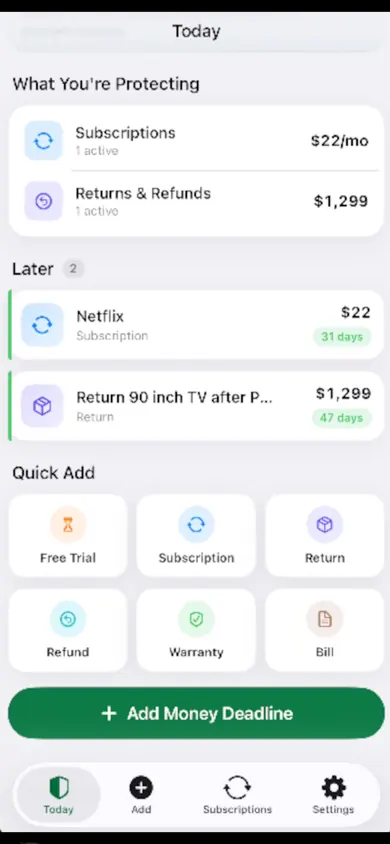
Today: what's charging next
The Today screen shows what you are protecting, with a monthly figure for subscriptions, then a Later list with days until each charge or deadline. Quick Add buttons cover free trials, subscriptions, returns, refunds, warranties and bills.
02
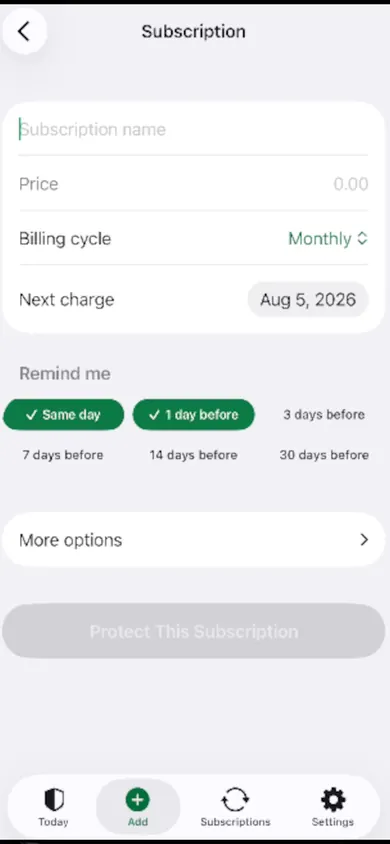
Add one in four fields
Name, price, billing cycle and next charge date. Then pick when to be reminded: the same day, or 1, 3, 7, 14 or 30 days before. Billing can be weekly, every 2 weeks, monthly, quarterly, every 6 months, yearly or custom.
03
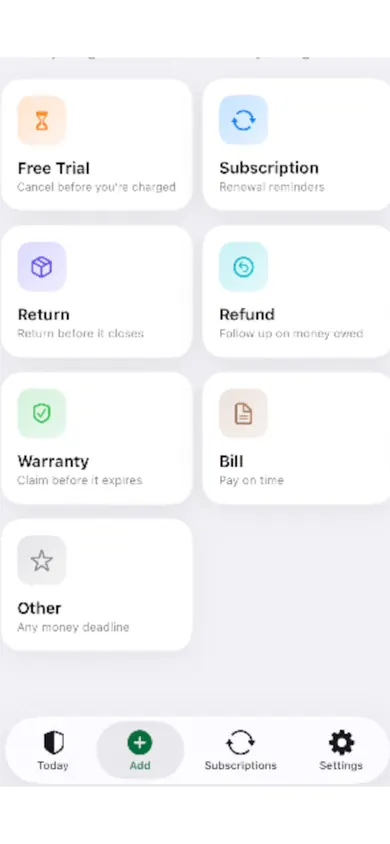
More than subscriptions
Any money deadline fits: a return window closing, a refund you are owed, a warranty claim, a bill to pay on time. Each gets its own reminder.
What MoneyShield does, and what it won't do
Does
- Ranks a Cancel First list from the signals you give it, with a reason for each
- Runs a What If planner: pick subscriptions, see the estimated change to the next 30 days, the month and the year
- Shows a 30-day charge timeline and monthly and yearly totals, marked as estimates
- Points you to the official cancellation route, with a checklist and request templates
- Keeps your own record: confirmation number, paid-through date, screenshot, notes, refund outcome
Won't
- Cancel anything for you
- Request or guarantee refunds
- Connect to your bank or read your email
- Give financial advice
You make every decision; MoneyShield keeps the dates and the arithmetic straight.
Free plan and MoneyShield Plus
You start with 7 days of Full Protection, with no payment required and no charge when the 7 days end. After that you move to the free plan automatically. Plus adds unlimited deadlines and subscriptions, early alerts up to 30 days ahead, the full Cancel First ranking, saved What If scenarios, quarterly and annual reviews, a receipt photo vault and export.
| Plan | Price | Renews |
|---|---|---|
| Plus Monthly | $3.99 | Monthly until cancelled |
| Plus Yearly | $24.99 | Yearly until cancelled |
| Plus Lifetime | $59.99 | One-time, no renewal |
One design decision we made
The Protection Record only counts charges avoided from cancellations you confirm. We could have shown a bigger, happier number by counting every subscription you open. We chose the smaller, honest one.
Who should pick something else
If you want an app that finds subscriptions automatically from your bank or inbox, MoneyShield is not it; it never connects to either. If you need full budgeting across every expense, a budgeting app is a better fit. And MoneyShield is iPhone only.
Subscription tracker questions
Is MoneyShield free?
There is a free plan. You start with 7 days of Full Protection with no payment required, then move to the free plan automatically unless you choose to upgrade. MoneyShield Plus (in the U.S., $3.99 a month, $24.99 a year or $59.99 once; prices may vary by region) adds unlimited deadlines and subscriptions, alerts up to 30 days ahead, the full Cancel First ranking, saved What If scenarios, quarterly and annual reviews, a receipt photo vault and export.
Does MoneyShield connect to my bank?
No. There is no bank connection, no login, no account and no email scanning. You add subscriptions yourself, and everything stays on your iPhone. You can make a backup file and restore it on a new iPhone.
Can MoneyShield cancel subscriptions for me?
No. Its Cancellation Assistant points you to the official cancellation route, whether you subscribed through Apple or directly with the company, with a step-by-step checklist and copy-ready request templates. You do the cancelling, and a follow-up reminder helps you check it went through.
How do I see what my subscriptions cost per year?
Add each subscription with its price and billing cycle (weekly, every 2 weeks, monthly, quarterly, every 6 months, yearly or custom). MoneyShield shows monthly and yearly totals, clearly marked as estimates, and keeps different currencies separate.
Will it remind me before a free trial ends?
Yes. You can set renewal, trial, cancel-by and follow-up reminders, from the same day up to 30 days before. Early alerts up to 30 days ahead are part of Plus.
Does MoneyShield tell me which subscriptions to cancel?
Its Cancel First list ranks subscriptions using signals you give it, such as usage, cost, renewal timing, price increases and trials ending, and shows the reason for each. The decision stays yours. MoneyShield does not give financial advice.
Does it track anything besides subscriptions?
Yes. You can add returns, refunds, warranties and bills as money deadlines, each with its own reminder.
See every sub in one list
Add your first three subscriptions tonight. Explore the labelled demo first if you like.

Updated November 2026
More from MoneyShield
- Cancel through Apple or the company? A 4-tap route finderAnswer up to 3 taps and see the right place to cancel: Apple, Google Play, PayPal or the company itself. Official steps, checked November 2026.
- Helping an elderly parent with subscriptions: questions answeredFor adult children sorting a parent's recurring charges: a live yearly-cost counter, plain answers on cancelling, and how to keep your parent in charge.
- How to keep track of subscriptions, from zeroA beginner's way to keep track of subscriptions: find them, list them, total them in 10 minutes. Free on-page tracker, no bank login.
- Keep track of holiday returns: 2026 deadlinesHoliday return deadlines for 2026, checked and dated, plus a simple way to track every return window before it closes. Free on iPhone.
Related
- How to keep track of subscriptions, from zeroA beginner's way to keep track of subscriptions: find them, list them, total them in 10 minutes. Free on-page tracker, no bank login.
- Cancel through Apple or the company? A 4-tap route finderAnswer up to 3 taps and see the right place to cancel: Apple, Google Play, PayPal or the company itself. Official steps, checked November 2026.
- Helping an elderly parent with subscriptions: questions answeredFor adult children sorting a parent's recurring charges: a live yearly-cost counter, plain answers on cancelling, and how to keep your parent in charge.
- Keep track of holiday returns: 2026 deadlinesHoliday return deadlines for 2026, checked and dated, plus a simple way to track every return window before it closes. Free on iPhone.