
How do you keep track of subscriptions?
Keep one list with four facts per subscription (name, price, billing cycle and next charge date) and set a reminder a few days before each charge. That is the whole system. Everything else is about filling the list once and looking at it monthly.
Most people do not lose money to one big mistake, but to small charges they forgot were there.
This guide is for beginners: no spreadsheets required, no bank login, and you can do the first pass on this page before you install anything.
Beginner questions about tracking subscriptions
What is the easiest way to keep track of subscriptions?
Write every subscription in one list with four facts: name, price, how often it bills, and the next charge date. Then set a reminder a few days before each charge. A notes app works for a handful; a tracker app helps once reminders and trial end dates pile up.
Where do I find all my subscriptions?
Check four places: your App Store subscriptions (on iPhone, Settings, then your name, then Subscriptions, per Apple Support), your card and bank statements for the last two to three months, your email for words like receipt, renewal and trial, and any PayPal or Google account you have paid through.
Does deleting an app cancel the subscription?
No. Apple's guide to cancelling a subscription has you cancel in Settings, not by deleting the app. If you subscribed on a company's website, you cancel with that company.
How do I stop a free trial from charging me?
Cancel before the trial ends. For App Store trials, Apple Support says to cancel at least 24 hours before the trial ends. Put the cancel-by date in your list the day you start the trial.
Should I use a spreadsheet or an app?
A spreadsheet is fine if you will open it every month. An app is better if you want reminders to come to you. Pick the one you will actually look at; the method matters less than the habit.
Is MoneyShield free?
Yes, with a free plan. New users get 7 days of Full Protection with no payment, then move to the free plan automatically. MoneyShield Plus adds unlimited subscriptions and deadlines, alerts up to 30 days ahead, the full Cancel First ranking and more: $3.99 a month, $24.99 a year or $59.99 once in the U.S.
Does MoneyShield connect to my bank?
No. There is no bank connection, no login and no email scanning. You add each subscription yourself, and everything stays on your iPhone.
A subscription audit, one Sunday morning
Here is an example, made up but typical. Picture a Sunday with coffee and a vague feeling that money keeps leaking. You guess four subscriptions: one streaming service, music, phone storage and a gym.
Step one is the iPhone: Settings, your name, Subscriptions. Two more appear: a photo editor from a free trial in spring, and a meditation app you opened twice. Step two is the card statement for the last three months, read line by line. A news site, billed by the company directly, and a meal-kit plan paused but not cancelled.
Now there are eight, not four. You write each one down with the price and the next charge date, and turn every price into a yearly number. The photo editor is $59.99 a year and renews in nine days. Nobody has opened it since May.
The moment that matters is not the total; it is seeing which charge comes next.
You cancel the photo editor in Settings, screenshot the confirmation and note the paid-through date. The meal kit needs the company's website. You set a reminder for the gym, which has a cancel-by date in its contract, and keep the rest. Twenty minutes, one cancellation, one reminder, and a list that can be checked next month in five minutes.
Who a subscription tracker is not for
We make MoneyShield, and it will not suit everyone. Pick something else if:
- You want it automatic. MoneyShield never reads your bank or email; you add each subscription yourself. If you want charges found for you, you need a bank-connected budgeting app, and you will be sharing bank access to get it.
- You want someone to cancel for you. MoneyShield points you to the official cancellation route and gives you a checklist and request templates, but you do the cancelling. It does not request or guarantee refunds.
- You have two subscriptions. Honestly, a calendar reminder is enough. Come back when trials and yearly renewals start to stack up.
- You use Android. MoneyShield is iPhone only.
How to track subscriptions in 3 steps
- 1Find them. Check App Store subscriptions on your iPhone, then two or three months of card and bank statements, then your email for receipt, renewal and trial. Anything billed yearly is easy to miss in one month, so go back far enough.
- 2List them with dates. Name, price, cycle, next charge. In MoneyShield you add each one with its billing cycle (weekly to yearly, or custom) and choose reminders: same day, 1, 3, 7, 14 or 30 days before. Trials get a cancel-by date.
- 3Review monthly. One subscription at a time, one decision each: keep, review later, or cancel. MoneyShield's Cancel First list ranks candidates by cost, usage, renewal timing, price increases and trials ending, and shows the reason for each.
A list you check once a month beats a perfect list you never open.
One design decision we made: MoneyShield's Protection Record counts savings only from cancellations you confirm. It would be easy to show a big flattering number from cancellations you only planned. We left that out on purpose.
What the tracker looks like
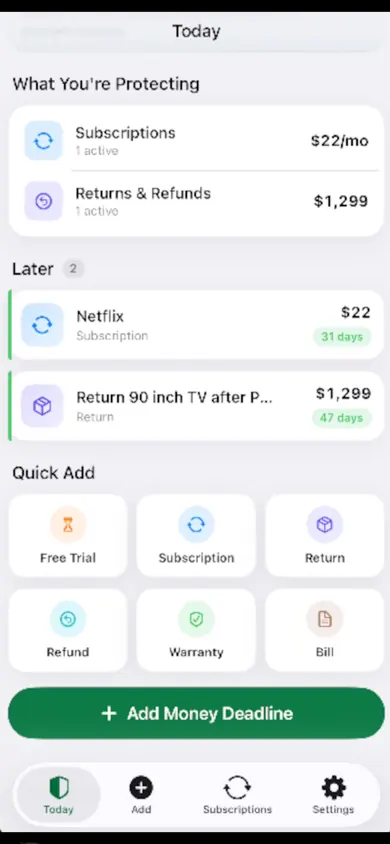
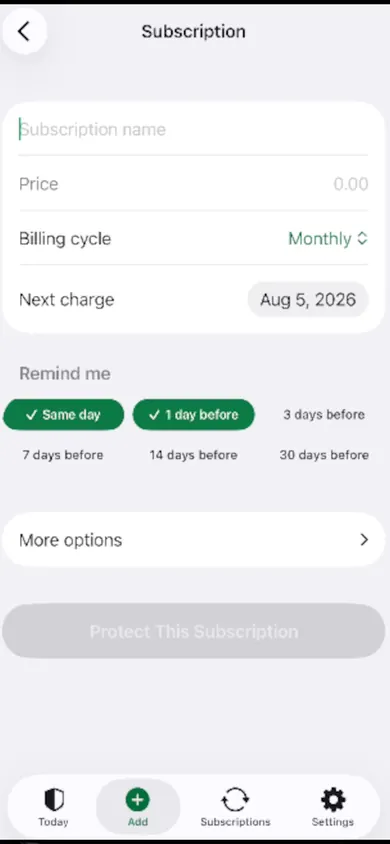
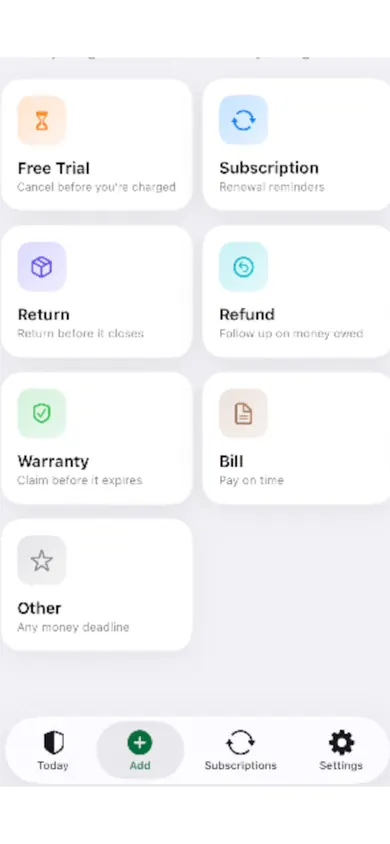
Try it: your first subscription list, right here
Add what you pay for. Nothing leaves this page and nothing is saved. Totals are estimates from the prices you type.
$0estimated per year
$0.00 a month across 0 subscriptions
Your next charge will show here.
Play it safe: keep the list on your iPhone
MoneyShield keeps this list, reminds you before each charge and walks you through a monthly review. Start with 7 days of Full Protection, then stay on the free plan unless you choose Plus. See MoneyShield on the App Store.

MoneyShield does not cancel subscriptions for you, connect to your bank or give financial advice. Savings figures are estimates.
Related
- MoneyShield: the private subscription tracker for iPhoneSee every subscription, its yearly cost and the next charge date, with reminders before renewals and trials end. No bank login. Free on iPhone.
- Cancel through Apple or the company? A 4-tap route finderAnswer up to 3 taps and see the right place to cancel: Apple, Google Play, PayPal or the company itself. Official steps, checked November 2026.
- Helping an elderly parent with subscriptions: questions answeredFor adult children sorting a parent's recurring charges: a live yearly-cost counter, plain answers on cancelling, and how to keep your parent in charge.
- Keep track of holiday returns: 2026 deadlinesHoliday return deadlines for 2026, checked and dated, plus a simple way to track every return window before it closes. Free on iPhone.