
How do you help an elderly parent with subscriptions?
Sit down together with three months of statements, list every charge that repeats, check which ones your parent still wants, and cancel the rest from the account that pays, with your parent's say-so. Then keep the list somewhere both of you can see the next charge before it arrives.
Make the costs visible. Let your parent make the calls.
Honest limits, before you start
- No app finds the charges for you here. MoneyShield does not connect to a bank, read email or scan statements. You or your parent type each subscription in. That is slower, and it is also why nothing about their accounts leaves the phone.
- It does not cancel anything. The Cancellation Assistant points to the official route, gives a checklist and copy-ready request templates, and keeps a record. Your parent, or you with permission, still makes the cancellation.
- One phone, no sharing. There is no account and no family sync. If you both want to see the list, look at it together, or keep it on the phone of whoever does the monthly review.
- Free plan limits. After 7 days of Full Protection (no payment, no charge) you move to the free plan. MoneyShield Plus adds unlimited subscriptions and deadlines, alerts up to 30 days ahead and export: $3.99 a month, $24.99 a year or $59.99 once in the U.S.
Questions families ask about a parent's subscriptions
Can I cancel my parent's subscriptions for them?
Only with their permission and, usually, their login or their presence. Many companies will only talk to the account holder. Sit with your parent, let them say yes on the phone or tap the button, and keep the confirmation. If you hold a power of attorney, the CFPB's free guides for managing someone else's money explain your duties.
How do I find all of my parent's subscriptions?
Go through recent card and bank statements with them, line by line, and circle anything that repeats. Then check the places subscriptions hide: the Subscriptions list in their iPhone Settings, email receipts, PayPal and paper mail. Write each one down with its price and next charge date.
What if the subscription is billed through Apple?
If the receipt is from Apple, it is cancelled from the Apple Account that bought it: Settings, their name, Subscriptions, then Cancel Subscription, per Apple Support (2026). Apple also notes you can't cancel a family member's subscription from your own account; it has to be done from theirs.
My parent wants to keep things I think are a waste. What then?
It is their money. Show the yearly cost next to the monthly one and let them decide. A $14.99 newspaper they read every morning may be worth every cent to them. Your job is to make costs visible, not to choose.
Should I put the subscriptions on my phone or theirs?
Either works. A list on your phone means your parent's statements never need to go anywhere else; a list on theirs keeps them in charge. Some families keep one list and review it together once a month.
What if a charge looks like a scam?
Do not call numbers from the email or text. Call the bank using the number on the back of the card, and ask about the charge. Fraud is a bank question first, a subscription question second.
Does MoneyShield connect to my parent's bank?
No. MoneyShield has no bank connection, no login and no email scanning. You type in each subscription yourself, and the list stays on the iPhone you use.
A guided tour: one parent's list, screen by screen
The three store screenshots, with notes on what matters when the subscriptions are not yours.
 12
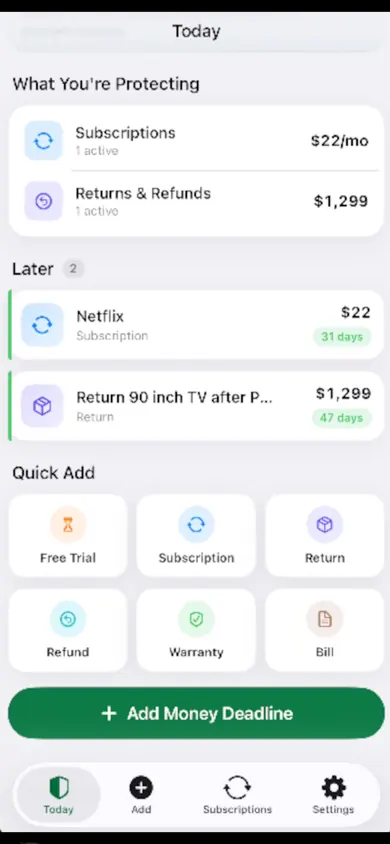
- What You're Protecting. Monthly total at the top, so "how much is this costing?" has one number.
- Later. Each item shows days until the next charge, so the review happens before the renewal, not after.
 34
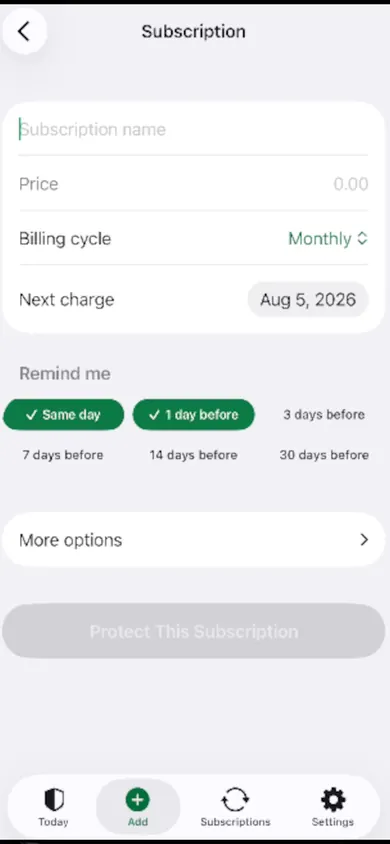
- Billing cycle. Weekly to yearly, plus custom. Yearly renewals are the ones parents forget most easily, because they come round once.
- Remind me. Same day, 1, 3, 7, 14 or 30 days before. A week gives time to call your parent first.
 56
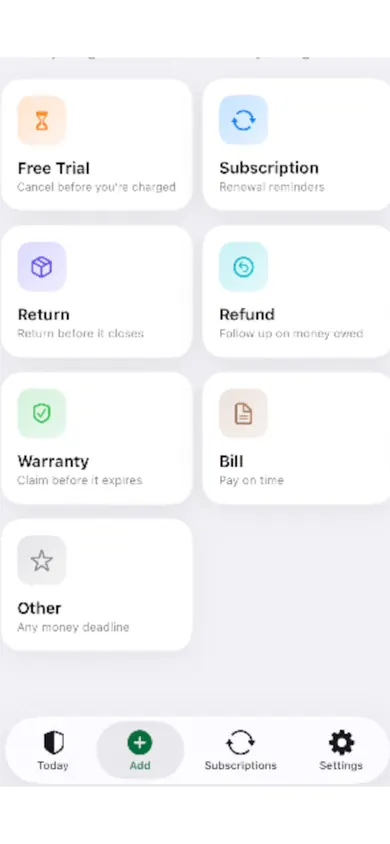
- Free Trial. "Cancel before you're charged": useful when a parent signed up for a trial on the phone.
- Bill and Warranty. The same list holds the water bill and the hearing-aid warranty, if that helps.
A list your parent can read is worth more than a perfect one only you understand.
Who this is not for
If your parent's bank already sends alerts for every charge and they read them, you may only need a monthly chat, not an app. If you need to manage everything remotely without being in the room, a shared spreadsheet or your bank's own tools fit better, because MoneyShield keeps its list on one iPhone. If you hold a power of attorney and are making financial decisions, read the CFPB guides for agents first; an app is not a substitute. And if your parent is not on iPhone and neither are you, it is not available.
How to set up a parent's subscription list in 3 steps
- Statements first, then the phone. Circle repeat charges on paper, then add each one in MoneyShield with its price, billing cycle and next charge date.
- Decide one at a time. The guided monthly review shows one subscription at a time with one decision each: Keep, Review Later or start cancelling.
- Keep the proof. For each cancellation, save the confirmation number, paid-through date and a screenshot, and set the follow-up reminder to check it went through.
One design decision we made: the yearly total is always marked as an estimate. Prices change, and a family conversation goes better with "about $480 a year" than with a number that looks more exact than it is.
Sit down with the statements this weekend
Add what you find together, set a reminder a week before each renewal, and let your parent make the calls. Get MoneyShield free on the App Store.

MoneyShield does not give financial or legal advice and does not cancel subscriptions or guarantee refunds.
Related
- MoneyShield: the private subscription tracker for iPhoneSee every subscription, its yearly cost and the next charge date, with reminders before renewals and trials end. No bank login. Free on iPhone.
- Cancel through Apple or the company? A 4-tap route finderAnswer up to 3 taps and see the right place to cancel: Apple, Google Play, PayPal or the company itself. Official steps, checked November 2026.
- How to keep track of subscriptions, from zeroA beginner's way to keep track of subscriptions: find them, list them, total them in 10 minutes. Free on-page tracker, no bank login.
- Keep track of holiday returns: 2026 deadlinesHoliday return deadlines for 2026, checked and dated, plus a simple way to track every return window before it closes. Free on iPhone.