What happens to student discount subscriptions after graduation?
Most student plans don't stop on graduation day: they keep billing, and at least one big one, Apple Music, switches itself to the full individual plan. Apple Support says a student subscription automatically renews as an Apple Music individual subscription once you're no longer a student or reach 48 months (published November 17, 2025). Spotify's page says its student discount lasts up to 4 years, re-verified every 12 months. The price change arrives quietly, as a normal renewal.
Updated November 2026 · Plan rules checked on each company's own support page.
A small story
The receipt that showed up in February
A December grad moves home, starts a job in January and forgets the music plan ever had the word “student” in it. In February the renewal email lists a new price. Nothing went wrong, exactly. The plan did what its rules say. The grad just never wrote the rules down.
That is the whole problem this page solves: not the money in one month, but the fact that four or five student plans change on four or five different dates, and none of them send a graduation card.
Student plans rarely end with a bang. They end with a renewal email.
Your first week: a 7-day student subscription check
Fifteen minutes a day. By Sunday, every plan has a date, a decision and a reminder.
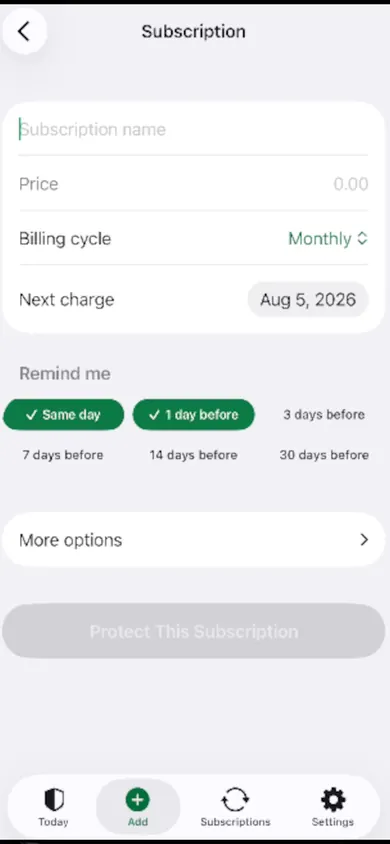
- Day 1 · List them. Open Settings, tap your name, tap Subscriptions (Apple Support). Then search your email for “student” and “receipt”. Add each plan to MoneyShield with its price, billing cycle and next charge date.
- Day 2 · Write the rule. For each plan, note its limit: 48 months for Apple Music student, 12-month re-verification for Spotify. Put the date in the plan's notes.
- Day 3 · Set reminders. MoneyShield lets you pick same day, 1, 3, 7, 14 or 30 days before a charge. Two reminders per plan is plenty.
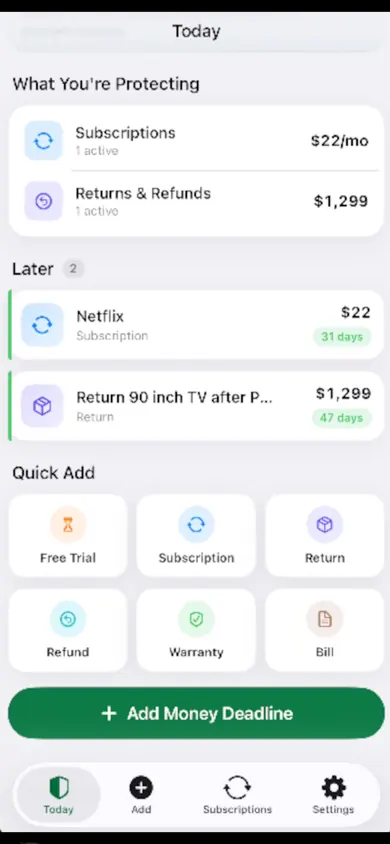
- Day 4 · Decide. Tap Keep, Review Later or start cancelling. The What If planner shows the estimated difference to your next 30 days, monthly and yearly spend.
- Day 5 · Cancel the right way. The Cancellation Assistant points you to the official route, through Apple or directly with the company.
- Day 6 · Keep proof. Save the confirmation number, paid-through date and a screenshot in the plan's private record.
- Day 7 · Follow up. A follow-up reminder asks you to check the cancellation actually went through. Turn on the optional monthly review if you want one.
Student plan rules, side by side
We checked each rule on the company's own support page in November 2026. Plans change, so treat this as a starting list, not the final word.
| Apple Music student | Spotify Premium Student | Any other student plan | |
|---|---|---|---|
| How long | Up to 48 months | Up to 4 years | Read its terms |
| Checks | Verification at sign-up (UNiDAYS in some regions) | Re-verify every 12 months (SheerID) | Varies |
| When it ends | Renews as an individual subscription | Support page doesn't say; check your account | Assume it renews |
| Source | Apple Support | Spotify Support | Your receipt email |
Safe default for any student plan: assume it renews, and put the date on your calendar.
Who MoneyShield is not for
- You want automatic detection. MoneyShield never connects to your bank or reads your email. You type each plan in. A bank-linked tracker will find more with less typing.
- You want someone to cancel for you. It points you to the official route and keeps your proof. You still press cancel.
- You have two subscriptions. A calendar reminder each is honestly enough.
- You're on Android. It is iPhone only.
A design decision we made: no bank link, ever. Students share phones, laptops and passwords more than anyone; we'd rather your money data never leave your iPhone.
New grad subscription questions
Does Apple Music student end when I graduate?
It doesn't simply stop. Apple Support says that if you're no longer a student, or you complete 48 months of a student subscription, it automatically renews as an Apple Music individual subscription (Apple Support, published November 17, 2025).
How long does Spotify Premium Student last?
Spotify's support page says the student discount applies for up to 4 years and that you renew and re-verify every 12 months through SheerID (Spotify Support, checked November 2026). Check your account page for what you'll be charged after.
Can I keep a student discount after graduating?
Only while you still meet that service's rules. Each one sets its own verification and time limit. If a service asks if you are still a student, answer honestly; the discount is tied to eligibility.
How do I see which subscriptions Apple bills me for?
On iPhone, open Settings, tap your name, then tap Subscriptions (Apple Support, published September 29, 2026). Plans you pay directly to a company, by card, won't appear there; look in your email receipts for those.
Does MoneyShield find my subscriptions automatically?
No. You add each one yourself: name, price, billing cycle and next charge date. There is no bank connection and no email scanning, which is the point for some people and a dealbreaker for others.
Is MoneyShield free?
You start with 7 days of Full Protection with no payment, then move to the free plan automatically. MoneyShield Plus ($3.99 a month, $24.99 a year or $59.99 once, U.S. prices) adds unlimited subscriptions and deadlines, alerts up to 30 days ahead, the full Cancel First ranking and export.
Honest limits
- The 7 days of Full Protection end on their own, with no charge; you then keep the free plan.
- Plus adds unlimited subscriptions and deadlines, early alerts up to 30 days ahead, the full Cancel First ranking, saved What If scenarios and export.
- Totals are estimates built from the prices you enter. MoneyShield doesn't request or guarantee refunds, and this isn't financial advice.
Start on your iPhone this week
Day 1 takes fifteen minutes. Start on your iPhone with the plan that says “student” on the receipt.

Related
- MoneyShield: the private subscription tracker for iPhoneSee every subscription, its yearly cost and the next charge date, with reminders before renewals and trials end. No bank login. Free on iPhone.
- Black Friday subscription deals: plan the renewalA Black Friday subscription deal usually renews at the regular price. See when your deal ends, what year two costs, and set a reminder first.
- Cancel through Apple or the company? A 4-tap route finderAnswer up to 3 taps and see the right place to cancel: Apple, Google Play, PayPal or the company itself. Official steps, checked November 2026.
- Set a free trial reminder on iPhone, step by stepA free trial reminder on iPhone that fires before you're charged: a live cancel-by countdown, a free calendar file, and a 3-step app guide.