For anyone billed twice for one service: spot the repeats, then trace where the second charge comes from.
Tap the 6 double charges20s
The clock starts on your first tap.
Free on iPhone · 7 days of Full Protection, no payment
Why am I paying for the same subscription twice?
Usually because one service is billed through two routes: through Apple and directly by the company, through two Apple Accounts, through a family member, or inside a bundle like a phone plan. Each route has its own bill and its own cancel button, so cancelling one leaves the other running.
The fix is to find the route behind each charge before you cancel anything. The flowchart below does that in four questions, using Apple Support's own "Cancel a subscription from Apple" page (September 2026).
Two charges almost always means two billing routes, not one company billing you twice.
The duplicate subscription flowchart
1. Does the charge show as APPLE.COM/BILL, and is it in Settings > your name > Subscriptions?
Yes Apple bills it on this account. Check whether the company also bills your card directly (step 2).
No Search your email for "receipt from Apple" and note which Apple Account it names (step 3).
2. Is there a second charge with the company's own name?
Yes You subscribed twice: once in the app through Apple, once on the company's website. Keep one. Cancel the other where it was started.
No Go to step 4.
3. Does the receipt name another Apple Account?
Yes, mine Sign in to that account and cancel there. Yes, a family member's Ask them to cancel; Apple says you cannot do it for them.
No receipt at all Another company is billing you. Check your statement and contact that company or your wireless carrier.
4. Do you pay for a bundle that already includes it?
Apple One Included services are canceled automatically with a refund for prepaid time, except iCloud+. A bigger iCloud+ plan is charged separately and the storage is combined (Apple Support, October 2026).
Phone or internet plan Ask the provider what the plan includes, then cancel the standalone copy.
Where the second charge comes from, compared
Billing route
On your statement
Who cancels
Apple, this account
APPLE.COM/BILL
You, in Settings > Subscriptions
Apple, your other account
APPLE.COM/BILL
You, signed in to that account
Apple, family member
Their statement, not yours
Only them
Company directly
The company's name
You, on its website or app account page
Carrier or bundle
Your phone or internet bill
The provider
Cancel where the charge was started, never just where you noticed it.
A mini story: the music app paid for twice
An illustration, not a real customer. Someone signs up for a music service on its website in March. In June, a new phone prompts them to subscribe inside the app, and they tap through. Now one charge says APPLE.COM/BILL and another says the company's name, both for the same amount, a few days apart.
They cancel in Settings, see the Apple charge stop, and assume it is fixed. The website subscription keeps going because it never lived in Apple's list. Two months later it is still there.
Cancelling the copy you can see is the most common way to keep paying for the one you can't.
What the game was teaching
The nine lines above hide three duplicate pairs, one for each common route:
Tunely Music: Apple plus the company's own card billing (flowchart step 2).
StreamBox: a standalone plan plus the same service inside a carrier plan (step 4).
PhotoKit Pro: the same app bought on two Apple Accounts (step 3).
The service names are made up. The patterns are the ones Apple Support's cancel page walks through.
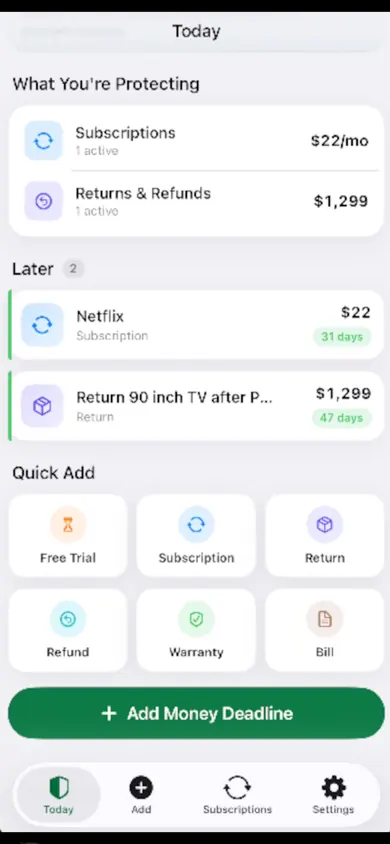
Today: what you pay for and what is charging next, in one list.
Honest limits of MoneyShield
It will not detect duplicates for you. There is no bank connection, no login and no email scanning, so it knows only what you type in. We chose that on purpose: nothing about your money leaves your iPhone.
It does not cancel or request refunds. Its Cancellation Assistant points to the official route, Apple or the company, with a checklist and a follow-up reminder to confirm it went through.
Free vs Plus. You start with 7 days of Full Protection with no payment, then move to the free plan automatically. Plus (U.S. prices: $3.99 a month, $24.99 a year or $59.99 once) adds unlimited subscriptions and deadlines, alerts up to 30 days ahead, the full Cancel First ranking and export.
Pick something else if you want an app that reads your bank feed and finds recurring charges by itself. MoneyShield is for people who would rather not link a bank.
Duplicate subscription questions
Why is the same subscription charging me twice?
Most often the service is billed through two routes: once through Apple and once directly by the company, through two different Apple Accounts, through a family member's account, or as part of a bundle such as a phone plan. Each route has its own billing and its own cancel button.
How do I see which subscriptions Apple bills me for?
On iPhone, open Settings, tap your name, then tap Subscriptions. That list shows only what Apple bills to the Apple Account you are signed in with, per Apple Support's "Cancel a subscription from Apple" page (September 2026).
Does Apple One cancel my old Apple Music or Apple TV subscription?
Yes, with one exception. Apple Support (October 2026) says existing subscriptions to services included in your Apple One plan are canceled automatically, with a refund for prepaid time, except iCloud+. If your iCloud+ plan has more storage than your Apple One plan, it is charged separately and the storage is combined.
Can I cancel a duplicate subscription on a family member's account?
No. Apple says to ask the family member whose Apple Account is on the receipt to cancel it; you cannot cancel their subscription for them.
What if there is no Apple receipt for the charge?
Then another company is probably billing you directly. Apple Support suggests checking your bank or card statement and contacting that company. If it came through your wireless carrier, contact the carrier.
Will MoneyShield find duplicate subscriptions automatically?
No. MoneyShield does not connect to your bank or scan email, so it only knows what you enter. Once both charges are in, they sit side by side on the 30-day timeline and in your totals, which is usually when the double charge becomes obvious.
Try it tonight
Enter both charges, see them side by side on the 30-day timeline, and keep a record of the one you cancel.