How many subscriptions is too many?
There is no magic number: you have too many subscriptions when you can no longer name each one, its price and its next charge date without looking. Four you track are fine. Two you forgot are too many, because the forgotten ones are the ones that renew.
Count is a guess. Tracking is the test.
What does my quiz score mean?
| Yes answers | What it means | Do this first |
|---|---|---|
| 5 to 6 | Not too many. You are managing them. | A monthly 10-minute review keeps it that way. |
| 3 to 4 | Borderline. Some are running unwatched. | Add next charge dates to the ones you missed. |
| 0 to 2 | Too many to manage right now. | Make the full list before cancelling anything. |
We weighted every question the same on purpose. A beginner with three tidy subscriptions should score higher than someone with one they have not looked at since spring.
A mini story: the first apartment
An illustration, not a real person. First apartment, first lease, first time paying every bill yourself. A music plan from school days, a streaming service a roommate recommended, cloud storage that started when the phone filled up, a fitness app trial from January, and a news site that was "just a dollar".
None of them felt big. Then the fitness app renewed for a full year in one charge, and the "dollar" news site had quietly moved to its regular price. Five subscriptions is not a lot. Five with no dates is.
The problem was never the number. It was the missing dates.
Where do the dates go in MoneyShield?
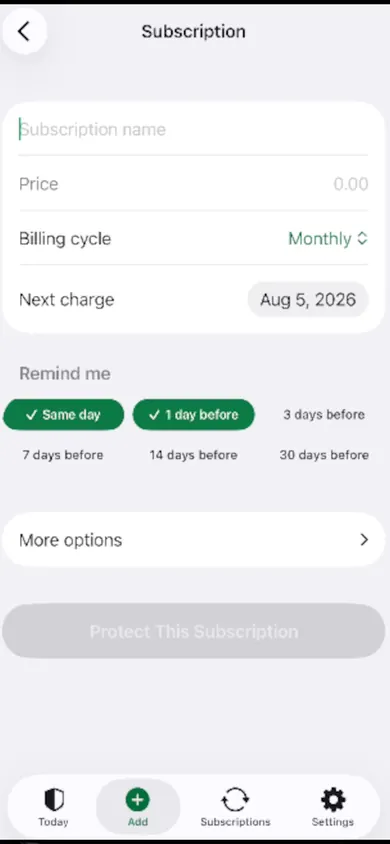 the date that matterspick when to hear about it
Honest limits?
- You type everything in. MoneyShield has no bank connection and no email scanning, so it cannot find subscriptions on its own. That is a trade we made for privacy: your list stays on your iPhone.
- It does not cancel for you or get refunds. It points you to the official cancellation route, Apple or the company, and reminds you to check it went through.
- Totals are estimates built from the prices you enter.
- Free and Plus. 7 days of Full Protection with no payment, then the free plan. Plus ($3.99 a month, $24.99 a year or $59.99 once, U.S. prices) adds unlimited subscriptions and deadlines, alerts up to 30 days ahead and the full Cancel First ranking.
How do I start tracking subscriptions as a beginner?
- List them. Check Settings, your name, Subscriptions (Apple Support, September 2026), then one bank or card statement for anything billed directly.
- Date them. Add each one with its price, billing cycle and next charge date. Choose when you want a reminder.
- Decide one at a time. The guided monthly review shows one subscription per step: Keep, Review Later, or start cancelling.
Who should skip MoneyShield?
If you want an app that reads your bank account and finds recurring charges by itself, pick a bank-linked budgeting app instead. If you have two subscriptions and a good memory, a phone note is enough. MoneyShield suits people with a handful or more who would rather not link a bank.
Notes app, spreadsheet or subscription tracker?
| Notes app | Spreadsheet | MoneyShield | |
|---|---|---|---|
| Cost | Free | Free | Free plan; Plus optional |
| Reminders before charges | Set by hand | No | Renewal, trial and cancel-by |
| Yearly total | Your maths | A formula | Monthly and yearly estimates |
| What to cancel first | Your call | Your call | Cancel First list with reasons |
| Bank link needed | No | No | No |
Quick questions
How many subscriptions does the average person have?
Surveys give very different numbers depending on what they count, so we do not quote one. A more useful test is whether you can name each subscription, its price and its next charge date without looking. If you can't, you have more than you are tracking.
Is 5 subscriptions too many?
Not by itself. Five you use and track is fine. Two you forgot about is too many. The quiz on this page scores tracking, not the count.
How do I find all my subscriptions on iPhone?
Open Settings, tap your name, then tap Subscriptions to see what Apple bills you for, per Apple Support (September 2026). Then check your bank or card statement for anything billed directly by a company, and your phone bill for bundles.
Which subscription should I cancel first?
Start with what you have not used in 30 days, then anything renewing yearly soon, then free trials about to convert. MoneyShield's Cancel First list ranks subscriptions using usage, cost, renewal timing, price increases and trials ending.
Does MoneyShield connect to my bank?
No. There is no bank connection, no login and no email scanning. You add subscriptions yourself, and everything stays on your iPhone.
Is MoneyShield free?
You start with 7 days of Full Protection with no payment and no charge when the 7 days end; then you move to the free plan automatically. Plus is $3.99 a month, $24.99 a year or $59.99 once (U.S. prices) and adds unlimited subscriptions and deadlines, earlier alerts and export.

Get MoneyShield free
List every subscription once, give each a date, and hear about it before it charges.

MoneyShield: Sub Tracker on the App Store · Updated November 2026
Related
- MoneyShield: the private subscription tracker for iPhoneSee every subscription, its yearly cost and the next charge date, with reminders before renewals and trials end. No bank login. Free on iPhone.
- How to keep track of subscriptions, from zeroA beginner's way to keep track of subscriptions: find them, list them, total them in 10 minutes. Free on-page tracker, no bank login.
- Which streaming service should I cancel? A free quizTick the streaming services you pay for, add your prices, and see which one to cancel first. A free calculator and 4-question quiz, no sign-up.
- Black Friday subscription deals: plan the renewalA Black Friday subscription deal usually renews at the regular price. See when your deal ends, what year two costs, and set a reminder first.