
What is the best Ontario overtime tracker app?
If you want an app that starts from Ontario's 44-hour weekly rule and checks your pay statement line by line, EarnCheck is the one of the four we checked that does both; we make it, so weigh that. If you mainly want a live clock-in timer or U.S. tax estimates, another app below fits better.
We read four App Store listings on the U.S. store on November 3, 2026. We only wrote down what each listing says. Where a listing is silent, the table says not stated, not no.
Ontario overtime tracker apps side by side
The short version: most hours trackers are built for a 40-hour week; very few say anything about 44.
| From the listing | EarnCheck (ours) | Hours Tracker: TimeClock44 | Work Hours Tracker & Paycheck | Clock In & Out Hours Tracker |
|---|---|---|---|---|
| Ontario 44-hour preset | Yes, linked to its official source | Not stated; listing names 8-hour daily or 40-hour weekly thresholds | Not stated; overtime settings per job | Not stated |
| Your own workweek start | Yes, even if it differs from the pay period | Not stated | Not stated | Not stated |
| Compare with your pay statement | Line by line: regular, overtime, premiums | Generates a paycheck PDF; no comparison stated | Creates pay stubs; no comparison stated | Not stated |
| Live clock in and out | Not stated; you confirm finished shifts | Yes, one-tap clock in and out | Yes, plus manual entries | Yes, with pause for breaks |
| Tax or net pay | No, gross only by design | U.S. federal and state estimates, or a custom percentage | Gross and net, with deductions | Not stated |
| Privacy label | Data Not Collected | Data not linked to you, incl. identifiers and usage | Data used to track you; contains ads | Usage data used to track you |
| Paid plan (U.S.) | $2.99/month or $19.99/year | $2.99/week, or $19.99 or $29.99/year | $1.99/month or $19.99/year | Several plans, $3.99/week to $49.99/year |
Checked on the U.S. App Store, November 3, 2026. Prices and features change, and privacy labels are written by each developer, not verified by Apple. Despite the 44 in its name, the TimeClock44 listing does not mention Ontario.
How a 44-hour overtime tracker works, in 3 steps
- Pick the rule and the week. Ontario's Employment Standards Act guide (2026) says most employees earn time and a half after 44 hours in a work week. In EarnCheck you start from that preset and set the day your employer's work week begins.
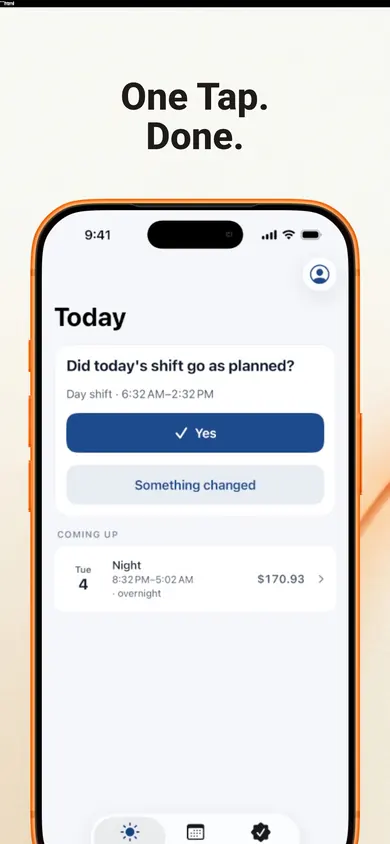
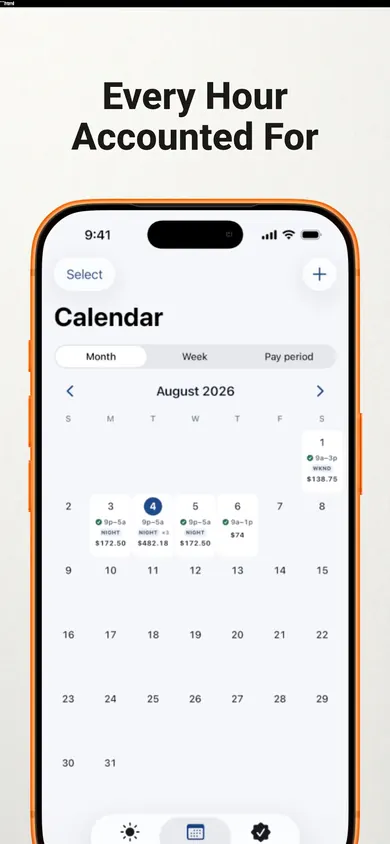
- Confirm each shift. A finished shift is one tap; adjust start, end or unpaid break if it ran long. A night shift that crosses midnight stays one shift, so the hours land in the right week.
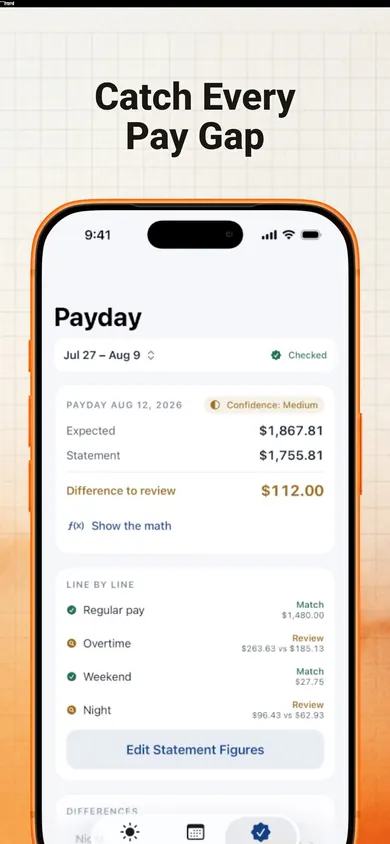
- Check payday. Type in the figures from your statement. Each line is marked Match, Difference to Review or Incomplete Information, and deductions stay separate.
The work week matters as much as the threshold: a Sunday-to-Saturday week and a Wednesday-to-Tuesday week can put the same overtime hours in different places.
Who EarnCheck is not for
We would rather you pick the right app than the one we make. Choose something else if:
- You want a running clock. If you like tapping in when you arrive and watching earnings tick up, the three other apps in the table describe exactly that.
- You want take-home pay. EarnCheck does not calculate taxes or deductions. TimeClock44 lists U.S. state tax estimates; Work Hours Tracker & Paycheck lists gross and net.
- You run payroll for others. EarnCheck is a personal record, not a payroll system. Small employers need proper payroll software.
- You are a manager or in an exempt job. Ontario's guide lists managers, supervisors and some special-rule jobs as not entitled to overtime pay. A 44-hour tracker will not reflect your rules.
Honest limits of a 44-hour overtime app
An app can only apply the rule you give it. Three cases where any tracker, ours included, needs your help:
- Averaging agreements. Ontario lets an employer and employee agree in writing to average hours over two to four weeks. Overtime then starts above 176 hours over four weeks, not above 44 in each week. EarnCheck's weekly preset will not model that; use your own agreement settings or ask payroll.
- Daily overtime. The Act has none, but some contracts and collective agreements do. Daily rules, double time and night or weekend premiums are part of EarnCheck Pro, not the free plan.
- Free is one pay period. The free version covers one job and a complete first pay period. Keeping a running record past that needs Pro.
A difference on payday is something to review, not proof of an error.
One design decision we made: EarnCheck never contacts your employer. If a line does not match, it lists likely explanations first (a late timesheet, a rate change, a different work week) and gives you an editable, neutral message that you send yourself, or not at all.
Worked example: one 47-hour week, two rules
Same shifts, $22.00 an hour, measured two ways. This is the kind of result EarnCheck's Show the Math screen spells out. It is an example of the arithmetic, not advice about what you are owed.
| Ontario, 44-hour week | U.S. federal, 40-hour week | |
|---|---|---|
| Regular hours | 44 × $22.00 = $968.00 | 40 × $22.00 = $880.00 |
| Overtime hours at 1.5× | 3 × $33.00 = $99.00 | 7 × $33.00 = $231.00 |
| Estimated gross | $1,067.00 | $1,111.00 |
The $44.00 gap comes only from where overtime starts. That is why an app set to 40 hours can make a correct Ontario pay statement look short, and why the preset matters. The U.S. Department of Labor (2026) uses 40 hours in a fixed 168-hour work week and does not allow averaging across weeks; Ontario's rule is different on both counts.
Proof: what the EarnCheck screens show
Questions about Ontario overtime apps
When does overtime start in Ontario?
For most employees covered by the Employment Standards Act, overtime starts after 44 hours in a work week and is paid at 1.5 times the regular rate. Some jobs have different rules or are exempt, and the Ontario overtime guide lists them.
Is there daily overtime in Ontario?
Not under the Employment Standards Act on its own. Ontario's guide says an employee does not earn overtime on a daily basis unless a contract or collective agreement says so. If your agreement has daily overtime, EarnCheck Pro lets you add a daily rule.
Can a regular hours tracker app handle the 44-hour rule?
Many hours trackers are built around the U.S. 40-hour week or an 8-hour day. Some let you set your own overtime settings, but their App Store listings do not mention Ontario. Check that the app lets you choose 44 hours and set the day your work week starts.
What is an overtime averaging agreement?
In Ontario, an employer and employee can agree in writing to average hours over two to four weeks. Overtime is then owed only when the average goes above 44 hours a week, so 176 hours over four weeks. A weekly tracker will show more overtime than you are owed under such an agreement.
Does EarnCheck tell me if I was underpaid?
No. It estimates gross pay from the hours and rules you enter and marks each line of your pay statement as Match, Difference to Review or Incomplete Information. A difference is something to check, not proof of an error. Your payroll team or the Ministry of Labour can confirm what applies to you.
Is EarnCheck free?
The free version covers one job and a complete first pay period with unlimited shifts, weekly overtime and a payday comparison. EarnCheck Pro adds unlimited pay periods, more jobs, advanced overtime and premium rules, and full exports. On the U.S. store it is $2.99 a month or $19.99 a year.
Try it tonight, on your next shift
Set the 44-hour preset, confirm tonight's shift, and see the math before payday. The free plan covers a full first pay period. See EarnCheck on the App Store.

EarnCheck estimates gross pay from what you enter. It is not payroll, tax or legal advice.
Related
- EarnCheck: the shift and pay tracker for iPhoneLog shifts, see your estimated gross pay with overtime, then compare it line by line with your pay statement. No account, no bank login.
- Worked 80+ hours in a pay period and got no overtime?Overtime is counted per workweek, not per two-week pay period. See why 80 hours can still owe overtime, and how to check your pay stub calmly.
- Home health aide timesheet printable, with travel timeA free printable weekly timesheet for home health aides, with a column for drive time between clients and a box to check your pay statement.
- Pay stub abbreviations explained: 34 codes decodedREG, OT, FIT, OASDI, CPP, YTD: what each pay stub code means, whether it is pay or a deduction, and a decoder you can type into. U.S. and Canada.