Is it unprofessional to book appointments by text?
No: booking by text is not unprofessional in itself; what looks unprofessional is a slow, vague or wrong reply, and a clear text confirmation can be as professional as any booking page. Clients who text you have already chosen the channel. Meeting them there is service, not a shortcut.
The real risks of text booking are practical, not social: a time you agreed to without checking the calendar, a "next Friday" that meant two different days, or a confirmation that never got sent. Each of those has a fix, and none of them needs a website.
Professional is a fast, correct reply. The channel is the client's choice.
Proof: the screens behind a text booking
From the App Store screenshots. The callouts are ours.
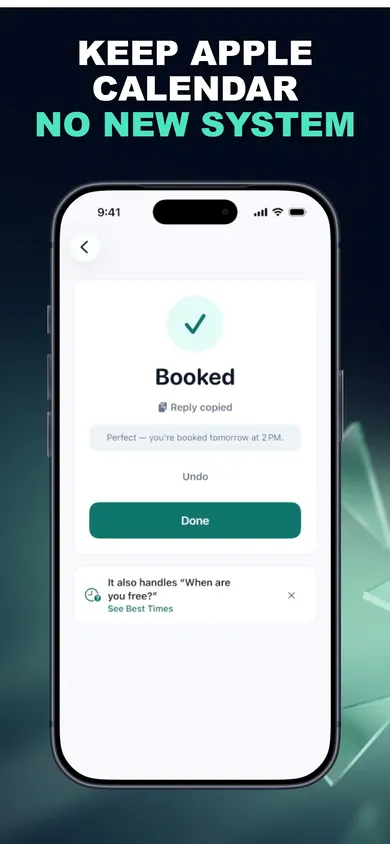
- BookedSaved to Apple Calendar only after you approved it.
- Reply copiedThe confirmation is on your clipboard; you paste and send it.
- UndoChanged your mind? Undo checks nothing changed in Calendar first.
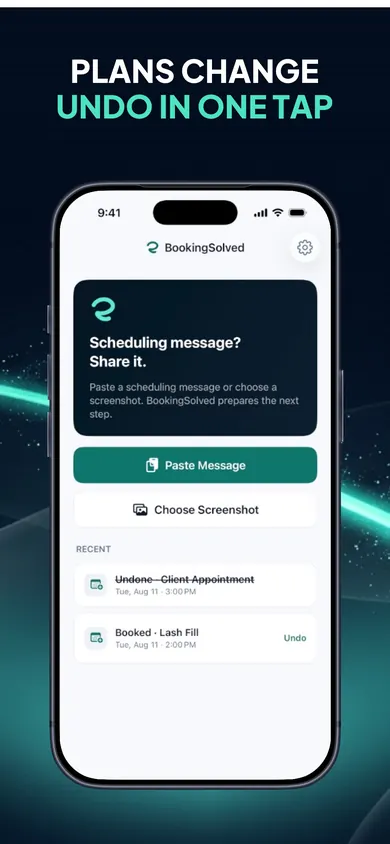
- An undone bookingStruck through in Recent, so you can see what was reversed.
- Undo, laterRecent bookings keep their Undo. Undo is free, always.
How to book clients by text without double booking, in 3 steps
- Share the request. Paste the client's message, choose a screenshot, or use the Share Sheet. BookingSolved reads only what you choose, on your iPhone.
- Let the calendar answer. It finds service, date, time and duration, checks Apple Calendar, and flags anything missing or unclear. If the time is taken, you get nearby alternatives.
- Approve and reply. Nothing changes in Calendar until you approve. Then an editable confirmation is ready to send yourself.
Who BookingSolved is not for
- Businesses that want clients to self-book from a public page, or pay a deposit when they book. BookingSolved has no portal and stores no prices.
- Teams sharing one diary across several staff in a salon system. It works from your Apple Calendar on your iPhone or iPad.
- Anyone on an older iPhone. It needs iOS 18 or later.
- Pros who get one booking a week. Honestly, typing it yourself is fine.
A mini story: the first month
An illustration, not a real business. A new dog groomer opens in October with a handful of clients from a previous job. Everyone texts. In week two, the groomer reads "can I do the 14th at 3?" while driving, replies "yes!" at a red light, and realises at home that the 14th already has a 2:30 doodle that runs long.
Nothing about texting caused that. The reply went out before the calendar was checked. With the request shared into BookingSolved, the 3 p.m. slot would have shown as taken, with nearby alternatives, before any "yes" was sent.
The fix was never a website. It was checking before saying yes.
What a professional text confirmation includes
Our five-point check, the same one we used to design BookingSolved's replies:
Vague
yep see you fri!
Clear
Perfect, you're booked Friday, Nov 13 at 2 PM for a full groom, about 2 hours. See you then.
- Day and date, so "Friday" can't drift a week.
- Start time with AM or PM.
- The service, in the client's words if possible.
- How long it takes, so they plan around it.
- Where, if you travel or they come to you.
One design decision we made: BookingSolved never sends anything. It prepares the reply and copies it; you press send. That costs one tap, and it means no client ever gets a message you did not see.
Booking by text questions
Is it unprofessional to book appointments by text?
Not in itself. What reads as unprofessional is a slow, vague or wrong reply. A prompt confirmation that names the day, date, time, service and length is as professional as a booking page, and for clients who already text you it is less work.
Should a new business have online booking?
Only if your clients want it. You can start with texts and a calendar, then add a booking page if volume makes it worth it. The thing to get right first is a calendar you trust.
How do I avoid double booking when clients text me?
Check your calendar before you reply, block the travel or prep time along with the appointment, and confirm in writing. BookingSolved checks Apple Calendar before proposing a time and re-checks right before saving.
What should an appointment confirmation text say?
The day and date, the time, the service, how long it takes, and where. Use our five-point checklist on this page; BookingSolved prepares an editable confirmation in a Friendly, Professional or Concise tone.
Do clients need an app to book with BookingSolved?
No. Clients keep contacting you the way they already do. You paste or share their message into BookingSolved on your iPhone, approve the booking, and send the reply yourself.
Is BookingSolved free?
Your first 3 completed actions (bookings, reschedules or cancellations) are free. BookingSolved Pro is a monthly or yearly subscription; the current price is shown in the app before you buy. Undo is always free.

Try it tonight
Share the next booking text, approve it against your calendar, send a clear reply. First 3 completed actions free.

BookingSolved: Client Booking on the App Store · Updated November 2026
Related
- BookingSolved: client booking from the messages you already getPaste a client's booking text and BookingSolved checks Apple Calendar, prepares the appointment and drafts your reply. You approve every step.
- Free booking app for mobile detailers: a 3-tap reply builderClients text you instead of using a booking link? Three taps build a ready reply and the calendar block, travel included. Free, no sign-up.
- How many cars a mobile detailer can do a dayCount how many cars fit in your mobile detailing day once drive time and setup are in, then book from client texts with buffers built in.
- How to schedule personal training clientsBooking link or replying by text? Two ways to schedule personal training clients before the New Year rush, compared honestly, with a slider demo.