
How do you schedule personal training clients?
Pick one method and make it your only door: either a booking link where clients choose from slots you publish, or replies by text checked against one calendar before you answer. Both work. Trouble starts when you run both half-way, and January, with resolutions starting Friday, January 1, 2027 and the first full week on Monday, January 4, is when half-way breaks.
Updated November 2026
Booking link vs reply by text, for personal trainers
We make BookingSolved, which helps with the text method, so read this with that in mind. We've tried to be fair to both.
| Booking link | Reply by text + calendar | |
|---|---|---|
| Who picks the time | Client, from your published slots | You offer 2–3 times; client picks |
| What clients must do | Open a link, maybe make an account | Text you, as they already do |
| Placing sessions by hand | Harder: open slots are open | Easy: you choose what to offer |
| Reschedules | Client self-serves, if allowed | “Can we move it?” text, then you approve |
| Your time per booking | Near zero once set up | A short reply each time |
| Best for | Many new clients, set packages | Regulars, in-home sessions, tight early slots |
A booking link saves your replies. Texting saves your control. Choose the one you'd miss more.
The text method, with BookingSolved
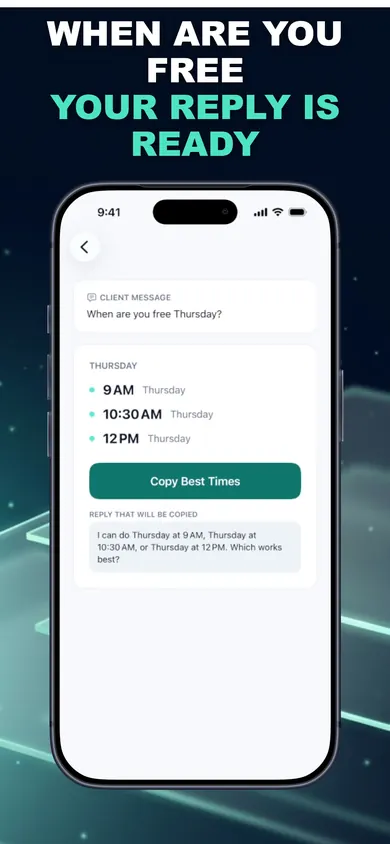
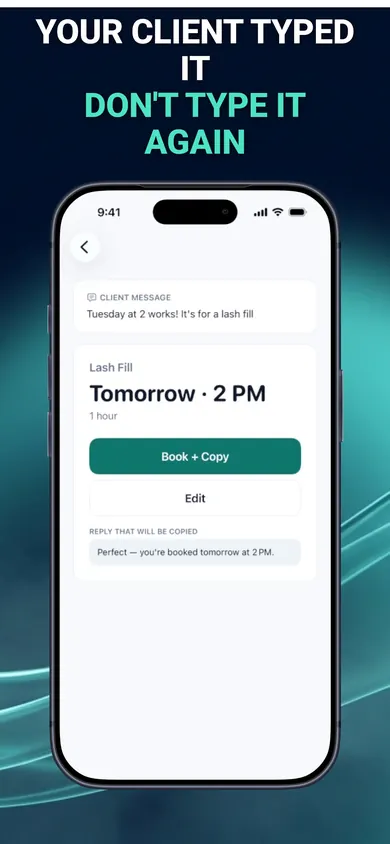
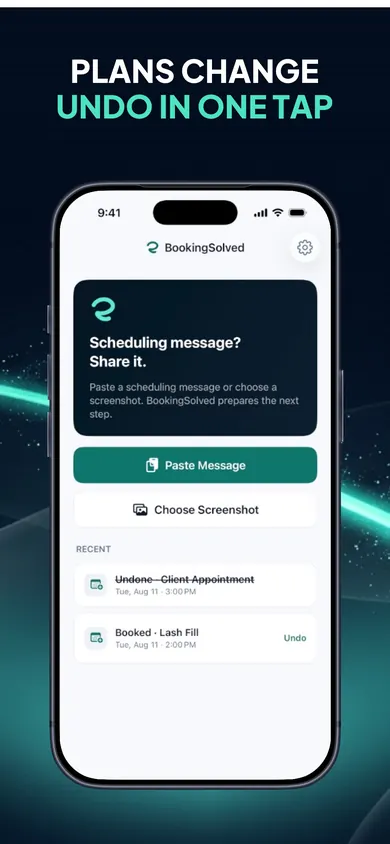
A client writes “Tuesday at 6 works!”. You paste it, share it, or pick a screenshot. BookingSolved finds the service, date, time and duration on your iPhone, checks Apple Calendar and prepares the booking plus a reply. When a new January client asks “when are you free?”, it suggests a few open times inside your business hours, around existing sessions, using each service's length and buffer.
How to set it up before January 4
- Make your services. The starter lists cover salons, barbers, nail studios, cleaning, detailing, tutoring and more; edit any name and duration, so “Intro session, 60 min” and “Check-in, 30 min” take a minute. Add a prep or travel buffer for in-home clients. No prices are stored.
- Set business hours, then block your own. Put your own training, meals and admin in Apple Calendar first. Suggested times go around existing appointments, so blocked time stays yours.
- Answer every enquiry the same way. Paste, review, approve, send. Anything unclear, like “next Friday”, is flagged for you to confirm instead of guessed. Tap twice by accident and it won't create a duplicate.
A design decision we made: no connected inbox. BookingSolved only reads the message you choose to share, on your device. It means one extra paste, and it means your clients' messages never leave your phone.
Who should pick a booking link instead
- Trainers who want clients to book and pay at 2 a.m. without any reply from you. BookingSolved has no client-facing booking page and doesn't take payments.
- Gyms with a front desk and several trainers sharing one schedule.
- Anyone not on Apple Calendar, or on an iPhone older than iOS 18.
Honest limits: the first 3 completed actions are free, then BookingSolved Pro (monthly or yearly) is needed for unlimited bookings, reschedules and cancellations. Undo stays free. It won't fix a calendar that isn't up to date; Apple Calendar is the source of truth, so keep it true.
Personal trainer scheduling questions
What is the best way to schedule personal training clients?
The one your clients will actually use. If they're happy to tap a link and pick a slot, a booking link saves you replies. If they text you, and most regulars do, keep texting and make the reply faster, with your calendar checked before you answer.
Should personal trainers use a booking link?
A booking link suits trainers who want clients to self-book any time and who are fine with clients choosing slots. It works less well when you place sessions by hand, for example keeping 6 a.m. slots for regulars or leaving travel time between in-home clients.
How do I handle the January rush of new clients?
Decide your session lengths and buffers before January 1, block your own training and admin time in your calendar, and answer every new enquiry with two or three specific open times instead of “when works for you?”. Specific times get answered faster.
Does BookingSolved work with Apple Calendar?
Yes. Apple Calendar stays your source of truth. BookingSolved checks it before proposing a time, re-checks right before saving, and nothing changes until you approve it.
Does BookingSolved text my clients for me?
No. It prepares an editable reply in a Friendly, Professional or Concise tone, and you send it yourself. It never contacts clients and never reads your conversations in the background.
Is BookingSolved free?
Your first 3 completed actions are free so you can try the full workflow, and Undo is always free. BookingSolved Pro, monthly or yearly, covers unlimited bookings, reschedules and cancellations. The current price is shown in the app before you buy.
Try it tonight, before the first January text
Set up two services, paste one old message, and see what it proposes. Try it tonight; nothing changes in your calendar until you approve.

Related
- BookingSolved: client booking from the messages you already getPaste a client's booking text and BookingSolved checks Apple Calendar, prepares the appointment and drafts your reply. You approve every step.
- Free booking app for mobile detailers: a 3-tap reply builderClients text you instead of using a booking link? Three taps build a ready reply and the calendar block, travel included. Free, no sign-up.
- How many cars a mobile detailer can do a dayCount how many cars fit in your mobile detailing day once drive time and setup are in, then book from client texts with buffers built in.
- Is it unprofessional to book appointments by text? 5 mythsNew to booking clients? Five myths about booking by text, flipped. What a professional confirmation includes, and how to stop double bookings.