Is there a free booking app for mobile detailers?
Yes, several booking apps have free plans, but many are built around a booking link; if your clients text you instead, the free route is to keep texting and answer faster, with the reply builder above or with BookingSolved, whose first 3 completed actions are free.
Booking links suit some detailers. Others have regulars who will never tap a link, and new clients who find you through a neighbor and simply text. For them, the slow part is not the booking page you do not have. It is reading the message, checking the calendar, working out drive time and typing the same reply for the fortieth time.
If your clients text, the booking app you need is the one that answers texts.
A mini story: four texts before lunch
An illustration, not a real business. A mobile detailer is halfway through an interior on Tuesday. The phone buzzes four times: a regular asking for Saturday at 10, a new client asking when you are free Saturday, a fleet manager asking to push Thursday by an hour, and a neighbor who just says "how much for my truck?"
By lunch the detailer has read all four, answered one, and booked the Saturday 10 a.m. full detail over the top of a 9 a.m. job that runs past noon. Nobody did anything wrong. The calendar simply was not open when the reply was typed.
Double bookings start in the reply, not in the calendar.
How BookingSolved handles a detailing request in 3 steps
- Share the message. Paste the text, pick a screenshot, or use the Share Sheet. Only what you choose is read, on your iPhone.
- Approve the booking. It finds the service, date, time and duration, checks Apple Calendar, and flags anything unclear, like "next Friday", instead of guessing. Nothing is saved until you approve.
- Send the reply. An editable confirmation is ready in a Friendly, Professional or Concise tone. You send it yourself.
Annotated screenshot tour
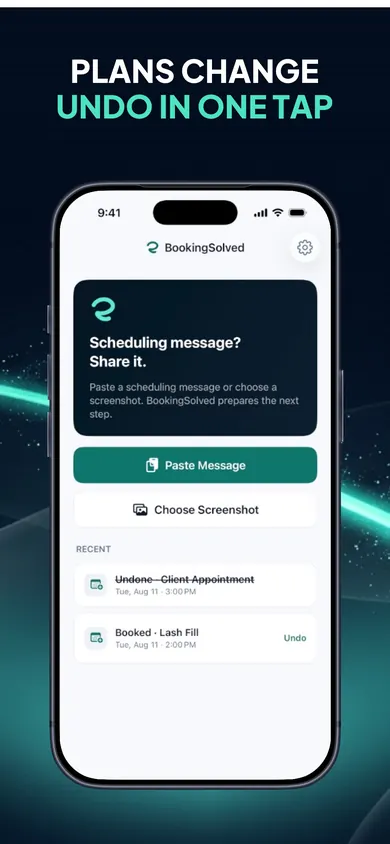
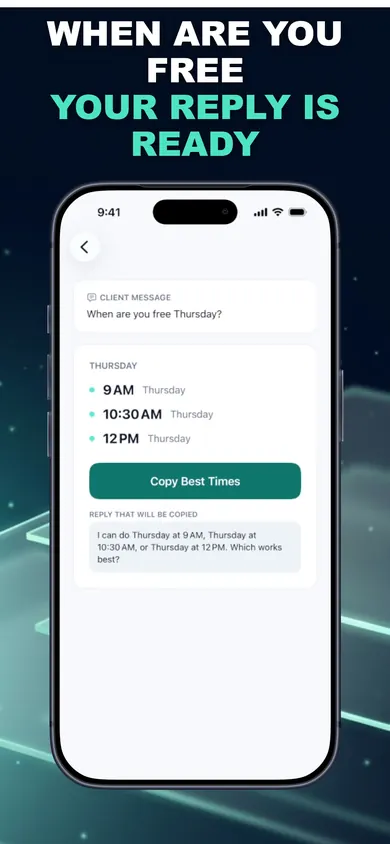
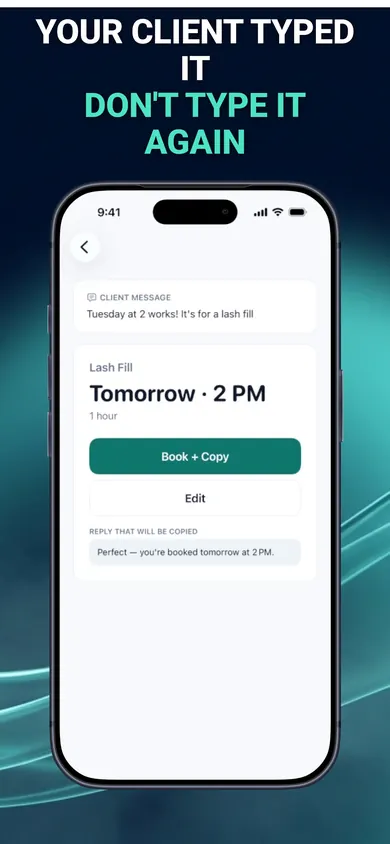
From the App Store screenshots. The demo uses a lash appointment; for detailing you edit the service presets, which include auto detailing.
 12
- Paste Message. Copy the client's text and paste it in.
- Choose Screenshot. Got the request in a DM? Screenshot it; it is processed on your iPhone, not uploaded.
 34
- Open times. A few slots inside your business hours, around existing appointments, using the service's duration and buffer.
- The reply. Ready to copy, listing the times and asking which works.
 56
- The proposed booking. Service, day, time and length, checked against your calendar.
- Book + Copy. One tap saves it to Apple Calendar and copies the confirmation. Tap twice by accident and it will not create a duplicate.
What the free reply builder gives you
The tool at the top is ours and free, with no sign-up and nothing stored. It returns two things:
- A calendar block: job length plus your drive and setup time. Block that, not just the job, and back-to-back mornings stop overlapping.
- A reply you can copy: a confirmation, two open times, or a moved time, worded plainly.
What it cannot do: see your calendar. It assumes Saturday is open from 9 a.m. That is the gap BookingSolved fills, because it checks Apple Calendar before suggesting anything.
One design decision we made: no prices in BookingSolved's service presets. "How much for my truck?" still gets your own answer, because a price typed by an app from a stored list is how quotes go wrong.
Pick something else if you want clients to pay deposits when they book, or a public booking page. BookingSolved does neither.
Detailer booking questions
Is there a free booking app for mobile detailers?
Several booking apps have free plans, and many are built around a booking link your clients use. If your clients text you instead, you can keep texting: use the free reply builder on this page, or BookingSolved, whose first 3 completed actions (bookings, reschedules or cancellations) are free before BookingSolved Pro.
How much travel time should a mobile detailer block between jobs?
Use your real drive times. The reply builder lets you pick 15, 30 or 45 minutes; BookingSolved lets you set a prep or travel buffer per service, and suggests open times around existing appointments using each service's duration and buffer.
Can BookingSolved read my texts automatically?
No. It reads only what you choose: text you paste, a screenshot you pick, or a message you share to it. It never reads conversations in the background and never contacts clients; you send every reply yourself.
Do my clients need to download anything?
No. Clients keep messaging you the way they already do. There is no booking portal and no connected inbox.
Does BookingSolved take deposits or store prices?
No. It turns requests into Apple Calendar bookings and replies. Service presets store names, durations and buffers, not prices.
What does BookingSolved Pro cost?
It is an auto-renewing monthly or yearly subscription billed to your Apple Account; the current price is shown in the app before you buy. Your first 3 completed actions are free and Undo is always free. It needs iOS 18 or later.

Get BookingSolved free
Paste the next detailing text, approve the booking, send the reply. First 3 completed actions free; Undo is always free.

BookingSolved: Client Booking on the App Store · Updated November 2026
Related
- BookingSolved: client booking from the messages you already getPaste a client's booking text and BookingSolved checks Apple Calendar, prepares the appointment and drafts your reply. You approve every step.
- How many cars a mobile detailer can do a dayCount how many cars fit in your mobile detailing day once drive time and setup are in, then book from client texts with buffers built in.
- How to schedule personal training clientsBooking link or replying by text? Two ways to schedule personal training clients before the New Year rush, compared honestly, with a slider demo.
- Is it unprofessional to book appointments by text? 5 mythsNew to booking clients? Five myths about booking by text, flipped. What a professional confirmation includes, and how to stop double bookings.