What is the best estimate app for contractors?
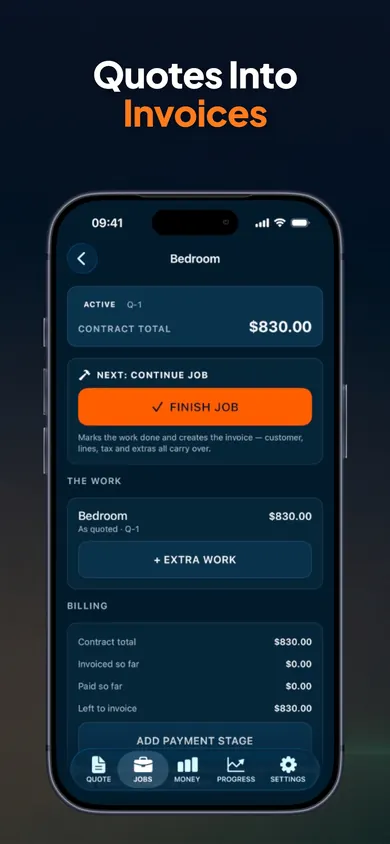
For solo contractors and small crews, a good estimate app reuses your real past prices, shows your margin before you send, and turns the yes into an invoice without retyping. That is what ScopeBid does on iPhone, even offline. It remembers how you price, so the next quote starts from a real job instead of a blank page.
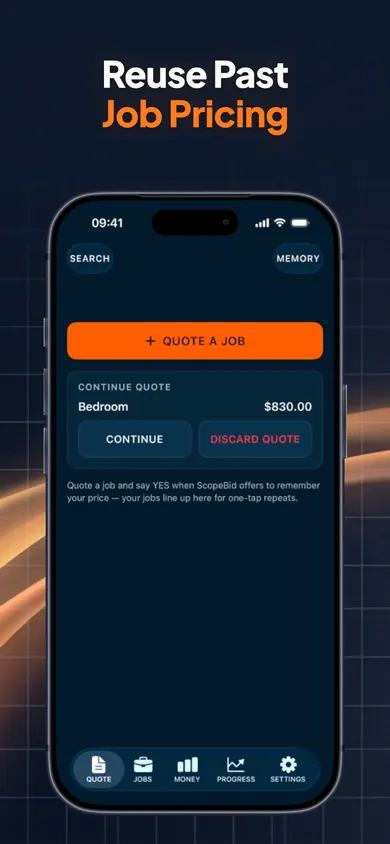
A quote should start from the last job you priced well, not from zero.
How the estimate and invoice flow works
- ReuseStart from a saved job, a trade template or a blank quote. Business Memory shows the source job and its date.
- AdjustPrice first, or cost first: enter labor and materials and get a suggested price. Hourly, per-person, crew, per-unit and area line items, with your own units.
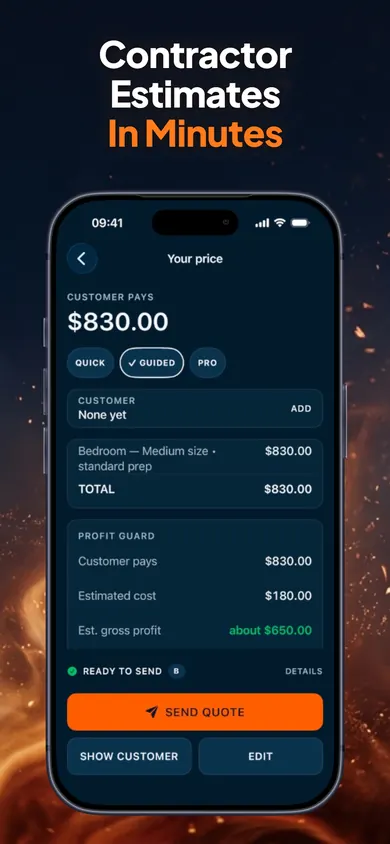
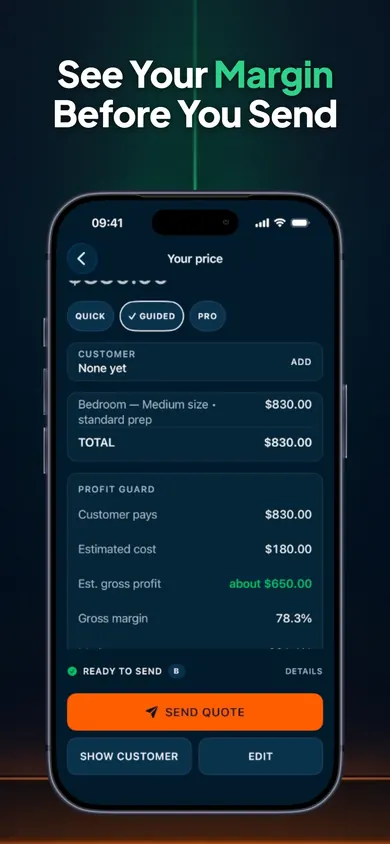
- Check profitProfit Guard separates customer price, direct cost, estimated gross profit, gross margin and markup. An optional minimum-margin warning can be overridden.
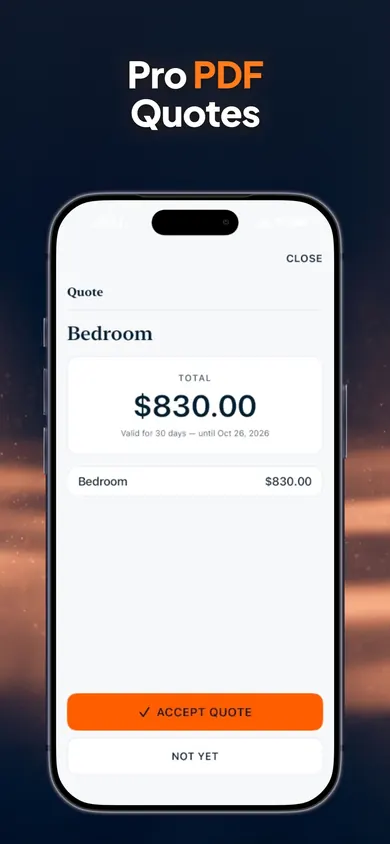
- SendA clean PDF with your logo, terms and payment details. Customers can accept in person with an on-screen signature.
- CompleteAdd change orders mid-job, turn the approved quote into an invoice, record deposits and partial payments.
- LearnA ten-second closeout compares estimated and actual cost, and feeds your next similar quote.
Six steps, one job record, no retyping between quote and invoice.
Contractor estimates that keep profit visible
Discounts are where margin quietly disappears. Enter one and ScopeBid shows exactly how it changes your estimated gross margin, the way the box at the top of this page does. Sales tax is never counted as profit.
One design decision we made
Cost and margin live on your screen and never on the customer's PDF. We separated them so you can price honestly in front of a client without hiding your phone.
Free and Pro
- Free: your first 3 quotes, with full PDFs
- Pro: unlimited quoting, full Business Memory, job costing and invoicing
- Monthly or annual; prices shown in the app before purchase
- Your work stays viewable and exportable either way
Honest limits
- Records payments; does not process cards or move money
- Not accounting or tax software; you set your own tax rates
- No account and no cloud copy; your data stays on the iPhone unless you export it
- iPhone only
Who should pick something else
If you run a larger company with office staff, dispatch and shared calendars, a field-service platform with team accounts will suit you better. If you mainly need bookkeeping, use accounting software and keep ScopeBid for the quote. ScopeBid is built for the person who walks the job, writes the price and does the work.
Questions about estimate and invoice apps
Is ScopeBid free?
Your first 3 quotes are free, with full PDFs. Everything you create stays viewable and exportable whether you subscribe or not. ScopeBid Pro, billed monthly or annually, adds unlimited quoting plus the full Business Memory, job costing and invoicing workflow. The annual plan may include a free trial for eligible new subscribers.
Does ScopeBid work without signal?
Yes. Quoting, PDFs, invoices and records work with no internet, which helps in basements, new builds and rural driveways. There is no account and no cloud copy of your business data; you can export a backup from Settings.
Can customers see my costs and margin?
No. Internal cost and margin are never printed on customer documents. The PDF shows your logo, the price, terms and payment details.
Can ScopeBid take card payments?
No. ScopeBid records payments you receive by cash, cheque, e-transfer, bank transfer or a card terminal, and tracks the balance. It does not process cards or move money.
Who is ScopeBid made for?
Independent service pros and small crews: painters, cleaners, handymen, landscapers, mobile detailers and small contractors who quote on site from an iPhone.
Is it accounting or tax software?
No. ScopeBid is an estimating and invoicing tool. You set your own tax rates and stay responsible for compliance, and sales tax is never counted as profit.
How does it reuse past pricing?
Business Memory keeps every job with its rates, hours and materials. A new quote can start from a saved job, a trade template or a blank page, and shows the source job and date so you can edit anything.
Quote your next job in minutes
Three quotes free, full PDFs, no account.

Updated November 2026
More from ScopeBid
- What to include in a car detailing estimateThe 12 lines every car detailing estimate needs, from vehicle size to condition fees. Free checklist with a score, plus how to send it from iPhone.
- Estimate vs quote vs bid, and 9 more terms new contractors mix upEstimate, quote, bid, proposal, change order, markup vs margin: a plain glossary for new service pros, with a 20-second sorting game.
- Losing money on handyman jobs? Find the leakBusy but broke? Put one real handyman job into our free calculator and see where the money goes: drive time, materials, markup vs margin.
- When a customer says your painting quote is too highA painter's FAQ for the 'too expensive' reply: see what a discount does to your profit in one tap, then answer with scope, not panic.
Related
- Estimate vs quote vs bid, and 9 more terms new contractors mix upEstimate, quote, bid, proposal, change order, markup vs margin: a plain glossary for new service pros, with a 20-second sorting game.
- When a customer says your painting quote is too highA painter's FAQ for the 'too expensive' reply: see what a discount does to your profit in one tap, then answer with scope, not panic.
- Losing money on handyman jobs? Find the leakBusy but broke? Put one real handyman job into our free calculator and see where the money goes: drive time, materials, markup vs margin.
- What to include in a car detailing estimateThe 12 lines every car detailing estimate needs, from vehicle size to condition fees. Free checklist with a score, plus how to send it from iPhone.
 ScopeBid / estimate & invoice