Dear hourly worker,
What is the best app to track hours worked and pay?
The best app to track hours worked and pay is the one that models how you are actually paid: the free DOL-Timesheet app covers plain hourly work under the U.S. 40-hour overtime rule, and EarnCheck, which we make, adds premiums, other overtime rules, several jobs and a line-by-line payday check. If your pay is mostly tips or commissions, neither is enough on its own.
That is why the picker above asks about your pay before it names an app. A tracker that cannot see your night differential will tell you everything is fine on the one paycheck where it is not.
The pay period that was 3.5 hours short
An illustration, not a testimonial. Two weeks of evening shifts at a care home. Nine shifts, one of them a double that ran past midnight. The stub says 76.5 hours. You remember more than that, but "remember" is not a number anyone in payroll can use.
Now run the same two weeks with your own record. Each shift was confirmed the minute it ended, the overnight double counted as one shift across midnight, and the unpaid break written down. Your record says 80 hours. The difference is 3.5 hours, and it sits on one day: the double. That is a five-minute conversation with payroll instead of a vague feeling, and it might still have an innocent explanation, such as a cut-off date.
A record turns "I think" into "On the 14th, 3.5 hours."
Your options, side by side
| Notebook | DOL-Timesheet | EarnCheck Free | EarnCheck Pro | |
|---|---|---|---|---|
| Cost | Free | Free | Free | $2.99/mo or $19.99/yr |
| Hours and breaks | By hand | Yes | Yes, one-tap confirm | Yes |
| Weekly overtime | Your maths | 1.5× after 40 hours | U.S. 40-hour, Ontario 44-hour or your agreement | Plus daily overtime and double time |
| Night, weekend, holiday premiums | Your maths | Not covered | No | Premiums you define |
| Compare with pay stub | By eye | Pay calculation | Line by line, first pay period | Every pay period |
| Jobs | Any | See listing | One | Several, kept separate |
| Languages | Yours | English, Spanish | English | English |
Sources: the DOL-Timesheet App Store listing and the Department of Labor's January 2023 announcement of its Spanish version; the EarnCheck App Store listing. Checked 3 November 2026.
What the law asks of your employer: the FLSA recordkeeping fact sheet lists hours worked each day and total hours each workweek among the records employers must keep, with payroll records kept for at least three years. Federal overtime is at least 1.5 times the regular rate after 40 hours in a workweek for non-exempt workers; some states and provinces add their own rules.
Your record does not replace your employer's. It lets you check it.
Honest limits
- Not payroll, not legal advice. EarnCheck estimates gross pay from what you enter. It does not calculate taxes or deductions. A difference is something to review, not proof of an error; your payroll team or labour authority can confirm what applies to you.
- Tips and commissions. Neither app on this page is built around them. Keep tip records separately.
- Free means one job and one complete first pay period. Your saved records stay viewable after that; more pay periods, more jobs, premium rules and full exports are EarnCheck Pro.
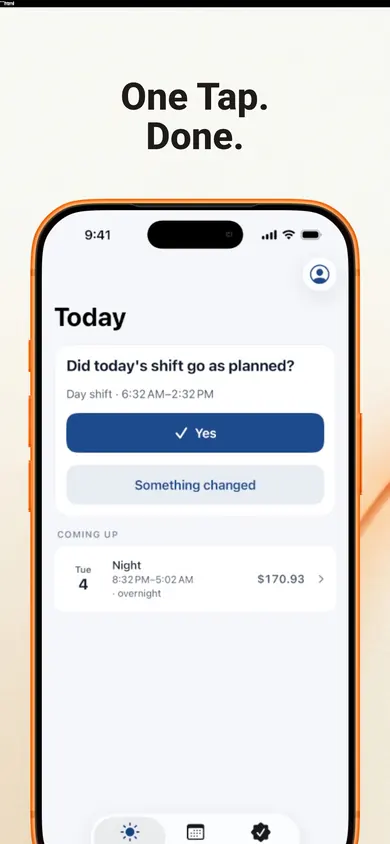
- One design decision we made: scheduled shifts never count until you confirm them. It costs you a tap after every shift, and it keeps your record about what happened, not what was planned.
- Who should pick something else: if you only need a federal 40-hour check, in Spanish, at no cost, the Department of Labor's own app is the honest first choice.
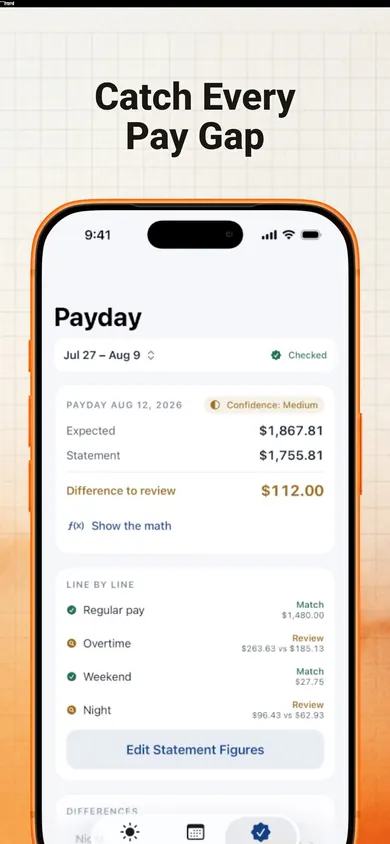
What a payday check looks like
Hours tracker questions
What is the best app to track hours worked and pay?
It depends on what your pay includes. For plain hourly work under the U.S. 40-hour rule, the free DOL-Timesheet app from the Department of Labor or EarnCheck's free tier both work. For night, weekend or holiday premiums, or more than one job, you need something that models those rules, such as EarnCheck Pro.
Is there a free government app to track work hours?
Yes. The U.S. Department of Labor's DOL-Timesheet app is free on iPhone and Android, in English and Spanish. It records hours and breaks and calculates overtime at 1.5 times the regular rate after 40 hours in a workweek. Its own listing says it does not cover tips, commissions, bonuses, deductions, holiday or weekend pay, or shift differentials.
Can I keep my own record of hours worked?
Yes. The Department of Labor's timesheet app exists so workers can keep their own records and check their pay. Your employer must also keep records, including hours worked each day and total hours each workweek, under the FLSA recordkeeping rules.
Does EarnCheck calculate taxes or net pay?
No. EarnCheck estimates gross pay from the hours and rules you enter and compares it with the gross figures on your pay statement. Deductions are kept separate. It is not a payroll system.
What does EarnCheck cost?
The free tier covers one job and a complete first pay period with unlimited shifts, weekly overtime and a payday comparison. EarnCheck Pro is $2.99 a month (EarnCheck Pro Monthly) or $19.99 a year (EarnCheck Pro Annual), with a 7-day free trial on the annual plan for eligible customers.
Does EarnCheck contact my employer?
Never. It can copy an editable, neutral message for payroll, but you decide whether to send it. Records stay on your device with no account.
Keep the record. Check the stub. Ask calmly.
The Honest Little Apps team

Get EarnCheck free
One job and a full first pay period, free. No account, no bank login, no employer login.

EarnCheck: Shift & Pay Tracker on the App Store · Updated November 2026
Related
- EarnCheck: the shift and pay tracker for iPhoneLog shifts, see your estimated gross pay with overtime, then compare it line by line with your pay statement. No account, no bank login.
- Ontario overtime tracker apps, compared honestlyWhich iPhone hours tracker handles Ontario's 44-hour overtime rule? We checked four App Store listings, including our own, line by line.
- Overtime with two jobs at different employers: a free checkTwo jobs, over 40 hours? Unrelated employers usually count hours separately; joint employers and one employer don't. Free calculator, DOL sources.
- Do seasonal workers get holiday pay? A Thanksgiving 2026 checkSeasonal or temp this Thanksgiving (Nov 26, 2026)? Tick 5 boxes to see what federal law requires and which pay stub lines to check. DOL sources.