
01
How do you schedule tutoring sessions with parents?
Keep one calendar as the only source of truth, give every lesson a set length with a buffer, and answer each parent's message with two or three specific times instead of an open question. Most of the friction is not the booking; it is the five messages it takes to get there.
'When works for you?' starts a conversation. 'Tuesday 4:00, 4:30 or 5:15?' ends one.
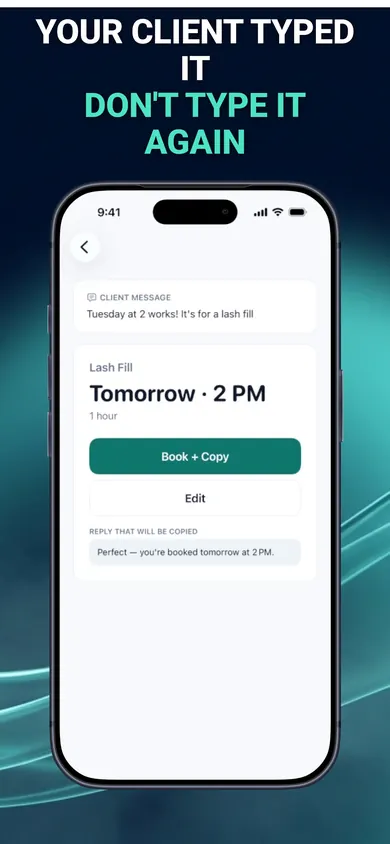
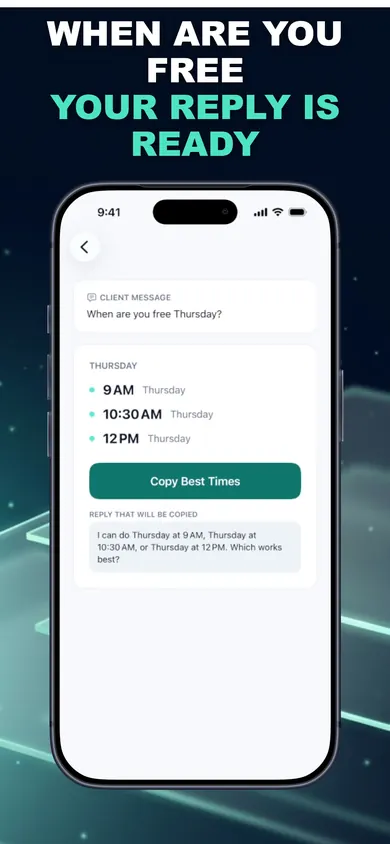
BookingSolved is our iPhone app for exactly that moment. You paste a parent's message or share a screenshot of it; it reads the date and time, checks your Apple Calendar, and prepares the booking and a reply. Nothing changes in your calendar until you approve, and you send the reply yourself.
02
Who this is not for
We would rather lose a download than waste your evening. Skip BookingSolved if:
- You want parents to book themselves. BookingSolved has no booking page or portal. If you want a public link families can pick a slot from, use a booking-page tool.
- You run a tutoring center. Several tutors, rooms and payments need a center-management system. BookingSolved is one person, one iPhone, one Apple Calendar.
- Your schedule lives in Google Calendar only. The app is built around Apple Calendar, and its listing does not mention Google Calendar.
- You want automatic reminders sent to families. BookingSolved never contacts clients. Every message goes out from you.
03
A Sunday night of tutoring texts
A made-up example that will sound familiar. It is Sunday evening and three parents have written. One says, "Can she do Tuesday at 4 instead of Wednesday?" Another asks, "When are you free Thursday for a trial lesson?" The third: "Sorry, he is sick, can we move tomorrow an hour later?"
Without help, that is three calendar checks, three replies typed from scratch, and one lesson you might forget to delete. With BookingSolved, the tutor shares the first message: it finds the existing Wednesday lesson, shows a before-and-after preview, and moves it to Tuesday at 4 on approval, with a reply ready to copy. The second message gets a few open times on Thursday inside the tutor's business hours, using the lesson length and buffer. The third finds tomorrow's lesson and proposes the later slot.
Anything vague, like "next Friday", is flagged instead of guessed. The tutor checks each one, taps approve, pastes the replies, and closes the laptop.
The parent typed the request once. You should not have to type it again.
04
Tutor scheduling questions
What is the best way to schedule tutoring sessions with parents?
Keep one calendar as the source of truth, give each lesson type a fixed length with a buffer, and reply to every request with specific times rather than 'whenever works'. Whether you use a booking link or reply by text, offering two or three concrete slots ends the back-and-forth fastest.
Should tutors use a booking link or just text parents?
A booking link suits tutors with many new families. Many private tutors keep texting because parents prefer it and lessons are recurring. BookingSolved is built for the second group: parents keep texting you, and you get the booking and reply prepared.
How do I reschedule a tutoring session without double-booking?
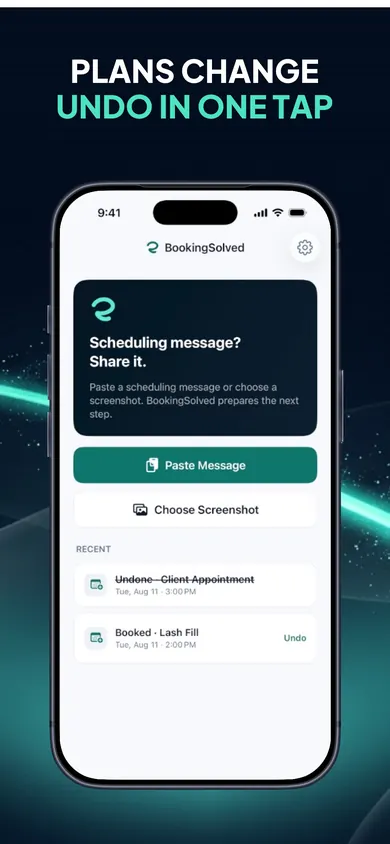
Find the existing lesson first, move it, then confirm. BookingSolved finds the existing appointment from a message like 'Can we move it an hour later?', shows a before-and-after preview, and moves it only when you approve.
Does BookingSolved message parents for me?
No. It never contacts clients and never reads your conversations in the background. You paste or share the message you choose, and you send every reply yourself.
Does it work with Google Calendar?
BookingSolved works with Apple Calendar, which it treats as your source of truth. The App Store listing does not mention Google Calendar, so we will not claim it.
Is BookingSolved free?
Your first 3 completed actions are free so you can try the full workflow, and Undo is always free. BookingSolved Pro, a monthly or yearly subscription, adds unlimited bookings, reschedules and cancellations. The current price shows in the app before you buy.
05
Proof: the screens behind a tutoring booking
These are the App Store screenshots. The examples on them use a lash studio; tutoring works the same way once you set up a service like "60-minute lesson" with its own length and buffer.
06
Honest limits for tutors
- Free is a trial, not a plan. The first 3 completed actions are free. After that, bookings, reschedules and cancellations need BookingSolved Pro. Undo stays free.
- Recurring lessons are not mentioned. The listing describes single bookings, reschedules and cancellations. If you set weekly lessons, you will likely keep doing that in Apple Calendar itself.
- No prices or invoices. Service presets store names, durations and buffers, never prices. Billing families happens elsewhere.
- iOS 18 or later. It runs on iPhone and iPad.
One design decision we made: requests and screenshots are processed on your device and not uploaded, and there is no account. A message from a parent about their child should not need to live on our servers to get a lesson booked.
Book the next lesson from the message
Paste tonight's parent message and see the booking and reply it prepares. Download free on the App Store.

Related
- BookingSolved: client booking from the messages you already getPaste a client's booking text and BookingSolved checks Apple Calendar, prepares the appointment and drafts your reply. You approve every step.
- Scheduling cleaning clients over the holidaysHoliday cleaning requests pile up fast. Work out how many cleans you can still fit, answer the common questions, and reply to clients from your iPhone.
- How to stop double booking clients when they book by textWhy solo pros double book clients who text, the 6 usual causes, and a fix for each. Tap a cause to see what stops it. Free on iPhone.
- Hair stylist holiday booking checklist: the 7-minute versionA free 7-minute holiday booking checklist for hair stylists, plus a printable December 2026 planner. Set your last day, buffers and full-up reply.