
How do you schedule cleaning clients during the holidays?
Count your real capacity first, protect slots for regular clients, then answer every new request with specific open times and a clear "full until" date when you run out. The holiday rush is not hard because of the cleaning; it is hard because dozens of booking messages arrive while your hands are busy.
Capacity is a number. Decide it once, before the messages decide it for you.
The calculator above uses a simple rule: each clean takes its length plus your travel buffer, and only whole cleans fit in a day. It is a planning estimate from your own numbers, not a promise about how your week will go.
Honest limits: what BookingSolved will not do in a busy season
- No booking page. Clients keep texting you the way they already do. If you want a public link where clients pick their own slot, use a booking-page tool.
- No team calendars. It checks one Apple Calendar on one iPhone or iPad. A crew with several cleaners and routes needs dispatch software.
- No prices or payments. Service presets hold names, durations and buffers only.
- Free is a trial. Three completed actions are free; after that, bookings, reschedules and cancellations need Pro. Undo is always free.
One design decision we made: anything unclear, like "next Friday" or "after the holidays", is flagged instead of guessed. In December, a wrong guess means a cleaner at the door of an empty house.
Three ways cleaners handle holiday requests
Reply by hand
Free and personal. Every message means opening Calendar, checking, typing. Easy to double-book on a busy evening.
Booking page
Clients pick from your open slots themselves. Means asking every client to switch how they book with you.
BookingSolved (ours)
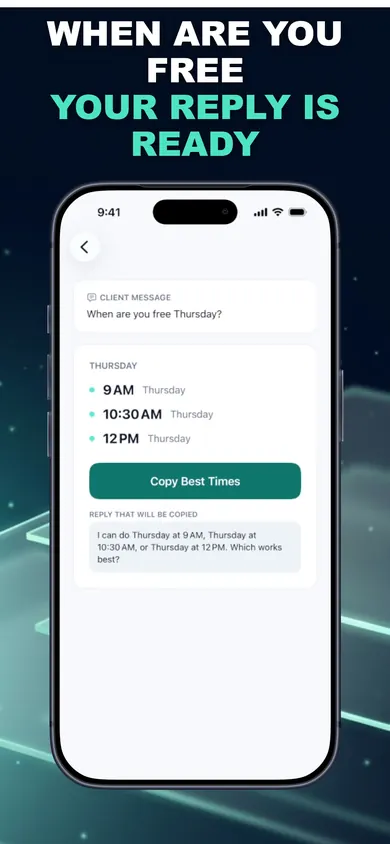
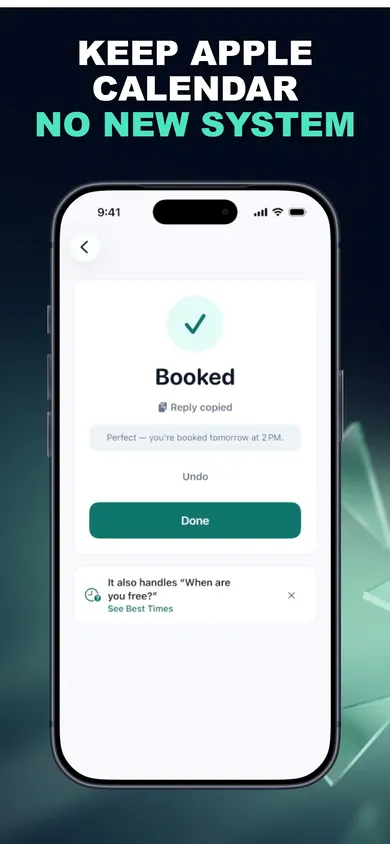
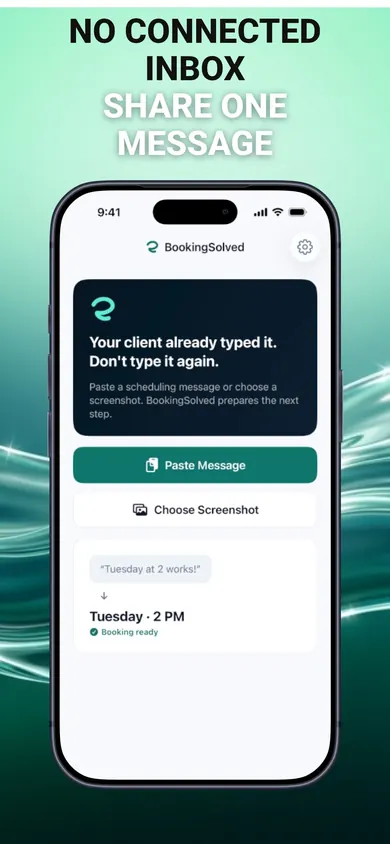
Clients keep texting. You paste or share the message, approve the booking, copy the reply.
Proof: a request, a booking, a reply
These are the App Store screenshots, tinted to match this page. The examples use a lash studio; a cleaning business sets up services like "Standard clean, 2.5 hours" with a travel buffer from the starter presets for cleaning services.
Who should skip BookingSolved this season
We make it, and it is not for every cleaning business. If you run several crews with an office dispatcher, if your calendar lives only in Google Calendar, or if you want reminders sent to clients automatically, another tool fits better. It is also not on Android. If you are a solo cleaner or a two-person team booking by text into Apple Calendar, it was built for you.
Holiday cleaning schedule questions
The questions cleaning businesses ask most in November and December, answered plainly.
How do I schedule cleaning clients during the holidays?
Work out your real capacity first (working days, hours, clean length and travel), protect slots for regulars, then offer specific times to everyone else. When you are full, say so with a date for your next opening rather than leaving messages unanswered.
Should regular clients get holiday priority?
Most small cleaning businesses give recurring clients first pick before opening slots to one-time holiday cleans. It is a business decision, not a rule; the point is to decide it before the requests arrive, not message by message.
How long should I allow between holiday cleans?
Use your normal clean length plus realistic travel, then add margin for traffic and guests who are still home. In BookingSolved, each service has its own duration and a prep or travel buffer, so open times already leave that gap.
Can I charge more for holiday cleaning?
Some cleaners add a seasonal or short-notice rate; others keep prices flat to protect regulars. That is your call. BookingSolved stores no prices, so pricing stays in whatever you already use.
How do I reschedule a holiday clean without double-booking?
Find the existing appointment, move it, and confirm with the client. BookingSolved finds the appointment from a message like 'Can we move it an hour later?', shows a before-and-after preview and moves it only when you approve. It re-checks your calendar right before saving.
What should I say when I am fully booked?
Be specific and kind: thank them, say you are full until a date, and offer the first opening after it. A clear no keeps the relationship better than silence during a busy week.
Does BookingSolved send messages to my clients?
No. It never contacts clients and never reads your conversations in the background. You paste or share the request you choose, and you send the reply yourself, in a Friendly, Professional or Concise tone.
Is BookingSolved free?
Your first 3 completed actions are free so you can try the full workflow; Undo is always free. BookingSolved Pro is a monthly or yearly subscription for unlimited bookings, reschedules and cancellations, with the current price shown in the app before you buy.
Make it a habit with BookingSolved
Next time a client texts "Can you fit us in before the 24th?", paste it in and see the open times and reply it prepares. Get BookingSolved on the App Store.

Related
- BookingSolved: client booking from the messages you already getPaste a client's booking text and BookingSolved checks Apple Calendar, prepares the appointment and drafts your reply. You approve every step.
- Hair stylist holiday booking checklist: the 7-minute versionA free 7-minute holiday booking checklist for hair stylists, plus a printable December 2026 planner. Set your last day, buffers and full-up reply.
- Scheduling tutoring sessions with parents, by textParents text 'Can we do Thursday at 4?' all week. A calmer way for private tutors to turn those messages into calendar bookings and replies.
- How to stop double booking clients when they book by textWhy solo pros double book clients who text, the 6 usual causes, and a fix for each. Tap a cause to see what stops it. Free on iPhone.