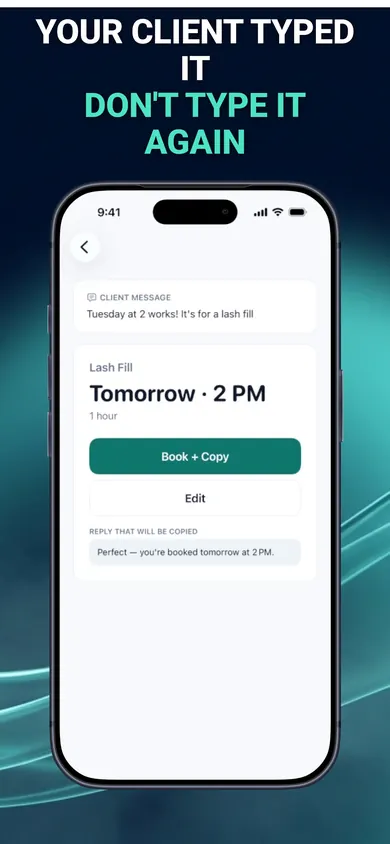
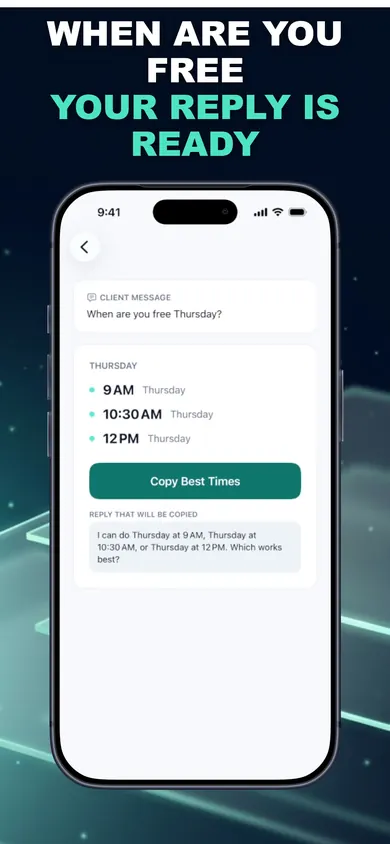
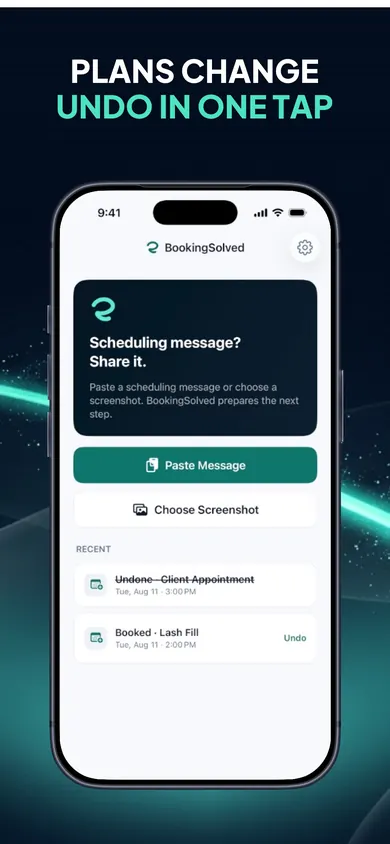
For nail techs drowning in December texts: tap a client message to see the booked reply.
Thursday Dec 17 · 10:30 AM, Friday Dec 18 · 2 PM, Monday Dec 21 · 9 AM
BookingSolved finds open times within your business hours, around existing appointments, using the fill's duration and buffer. You copy the best times.
Saturday 11 AM → 12 PM, preview first
It finds the existing appointment and shows a before-and-after preview. Nothing moves until you approve.
Which Friday? Flagged, not guessed
Unclear dates like "next Friday" are flagged for you to confirm instead of guessed.
Free on iPhone · first 3 actions free
How do nail techs handle Christmas rush booking?
Count your real December slots first, open them all at once with a clear last day (Christmas Eve is Thursday, December 24, 2026), answer every request from one calendar, and switch to a waitlist the moment you're full. The rush isn't one big problem. It's fifty small messages that all want an answer between sets.
You can't make December longer. You can stop retyping it.
How it works in 3 steps
Share the request. Paste the text, choose a screenshot of the DM, or use the Share Sheet. Only what you choose is read.
Check the details. Service, date, time and length are found on your iPhone. Anything vague is flagged.
Approve and send. The appointment goes into Apple Calendar only when you approve, and a reply is ready in a Friendly, Professional or Concise tone. You send it.
Your clients keep texting you. You just stop typing the same answer.
Honest limits before your busiest month
No booking page. Clients can't book themselves at midnight; they still message you.
No deposits or no-show fees. No prices are stored, and no cards are taken.
Apple Calendar only. It works on iPhone and iPad with iOS 18 or later.
Not free forever. The first 3 completed actions are free; unlimited use needs BookingSolved Pro, monthly or yearly. Undo is always free.
Who should pick something else: if you want clients to book and pay a deposit on their own, use a booking platform with a public page and card payments. BookingSolved is for techs who like booking by text and want it faster.
A Sunday night in early December
An illustration, not a real person.
Fourteen unread messages across texts and Instagram. Two want a fill "before the 24th", one wants to move Saturday, one says "next Friday?" without saying which, and one is a cancellation she would rather not read.
She screenshots the first DM and shares it. Open times on Thursday and Friday come back, around her existing sets and with her 15-minute cleanup buffer. Copy, send. The Saturday move shows a before-and-after preview; approve. "Next Friday" gets flagged, so she asks which one instead of booking the wrong week.
Twenty minutes later the inbox is quiet and the calendar is right. The cancellation opened a slot, and the first person on her waitlist gets it.
Christmas capacity check: how many sets can you fit?
Before you promise anyone, count your slots between now and Christmas Eve.
Example numbers. Your services, breaks and buffers decide your real count. In BookingSolved each service gets its own duration and prep or travel buffer.
Proof: the screens
A client text becomes a checked booking."When are you free?" answered from your Calendar.Plans change: Undo in one tap.
Christmas booking questions from nail techs
How do nail techs handle the Christmas rush?
Work out your real number of December slots first, open them in one go, and answer every request from the same calendar. When the slots are gone, start a waitlist instead of squeezing in extras you'll regret on December 23.
When should I open my Christmas books?
Early enough that regulars can plan, late enough that you know your own December. One simple approach is to announce an opening date in November and, post the last appointment day clearly, such as Thursday, December 24, 2026.
Should I raise prices for December?
That's your call and your clients'. If you do, say so before they book, in the same message as your openings, so nobody finds out at the desk.
How do I say no to a client politely before Christmas?
Keep it short and give them something: "I'm fully booked until the 24th, but I can do Monday the 28th at 11 or put you on my cancellation list." A real alternative lands better than an apology.
What do I do about December no-shows?
Have a written policy before the rush and send it with each confirmation. BookingSolved doesn't take deposits; if you need card deposits, you need a payment-enabled booking platform.
Does BookingSolved message my clients?
No. It never contacts clients and never reads your conversations in the background. You paste or share one request, approve the booking, and send the prepared reply yourself.
Is BookingSolved free?
Your first 3 completed actions are free so you can try the full workflow. BookingSolved Pro is a monthly or yearly subscription for unlimited bookings, reschedules and cancellations; the price is shown in the app before you buy. Undo is always free.
Get BookingSolved free
One design decision we made: nothing changes in your Calendar until you approve it, even in the busiest week of the year.
Lash fill schedule before ChristmasWork every regular's December lash fills backward from Christmas Eve (Thu Dec 24, 2026). Live countdown, 2-week vs 3-week slot math, and a booking routine.